


Small businesses run on limited time and limited people. Every hour spent on repetitive tasks—reformatting content, sorting email, prepping for meetings—is an hour not spent growing the business.
MCP servers change that math. They let AI handle the repetitive work using the tools you already have. No enterprise budget. No IT department. No coding.
The Short Answer
Yes. MCP servers give small businesses access to the same AI automation capabilities that enterprises are spending millions on—at a fraction of the cost. The ROI is immediate and measurable.
| Business Size | Without MCP | With MCP |
|--------------|-------------|----------|
| Solo operator | You do everything manually | AI handles content, email, research while you focus on clients |
| Small team (2-10) | Everyone wears multiple hats | AI automates shared workflows — briefings, reports, scheduling |
| Growing business (10-50) | Processes are inconsistent, tribal knowledge | AI standardizes workflows and makes knowledge accessible |
The Five Highest-ROI Automations for Small Business

These five automations deliver the most time savings for the least setup effort. Start with one, prove the value, then add more.
1. Content Repurposing (Save 2-4 Hours Per Article)
You write one blog post. MCP-connected AI turns it into:
| Output | Platform | Time to Create Manually |
|--------|----------|------------------------|
| 5 social media posts | LinkedIn, X, Facebook, Instagram, Threads | 45 min |
| 1 newsletter intro | Email / Substack | 20 min |
| 1 SEO summary | Google / site meta | 15 min |
| 3 pull quotes | Social graphics | 15 min |
| 1 thread/carousel | X or LinkedIn | 30 min |
| 5 Substack Notes | Substack | 25 min |
| 1 voiceover script | Podcast / video | 20 min |
| 5 alt-angle headlines | A/B testing | 15 min |
Total manual time: ~3 hours. With AI: ~15 minutes (review and approve drafts).
The AI reads your original article through the filesystem MCP server, generates all the variations, and saves them as files. You review, tweak if needed, and publish.
One article → 25+ content pieces. For a small business publishing weekly, that's 12+ hours saved per month.
2. Morning Briefing (Save 30 Minutes Per Day)
Instead of checking email, calendar, tasks, and news manually each morning:
Setup: Connect Calendar + Email + Task Manager + Web Search MCP servers.
What AI delivers at 6:30 AM:
Today's meetings with prep notes
Important emails that need attention (prioritized)
Overdue tasks
Relevant industry news
Monthly time saved: ~10 hours
This one automation pays for a Claude Pro subscription ($20/month) in the first week.
3. Email Triage and Draft Responses (Save 30-60 Minutes Per Day)
Setup: Connect Gmail MCP server.
How it works:
AI reads incoming emails
Classifies by priority (urgent, important, routine, spam)
Drafts responses for routine emails
Flags emails that need your personal attention
You review the drafts, hit send on the good ones, and personally handle only the ones that matter. Instead of reading 50 emails, you review 10 drafts and write 5 personal responses.
Monthly time saved: 10-20 hours
4. Meeting Prep and Follow-Up (Save 20-30 Minutes Per Meeting)
Setup: Connect Calendar + Email + CRM MCP servers.
Before the meeting, AI generates:
Attendee background (from CRM and recent emails)
Last interaction summary
Suggested talking points
Relevant documents or proposals
After the meeting, AI generates:
Action item list
Follow-up email drafts
Updated CRM notes
Calendar entries for follow-ups
For a business with 5 meetings per week, that's 8-12 hours saved per month.
5. Competitive Research (Save 1-2 Hours Per Week)
Setup: Connect Web Search MCP server.
Weekly automated research:
Competitor website changes
New product announcements in your space
Industry news and trends
Social media mentions of competitors
AI summarizes everything into a structured brief. You read a 2-page summary instead of spending hours browsing websites and social feeds.
Monthly time saved: 4-8 hours
The ROI Math
Let's make this concrete. Assume a small business owner's time is worth $75/hour (conservatively).
| Automation | Monthly Hours Saved | Monthly Value |
|-----------|-------------------|---------------|
| Content repurposing | 12 hours | $900 |
| Morning briefing | 10 hours | $750 |
| Email triage | 15 hours | $1,125 |
| Meeting prep/follow-up | 10 hours | $750 |
| Competitive research | 6 hours | $450 |
| Total | 53 hours | $3,975 |
Monthly cost:
Claude Pro: $20/month
Or local models (Ollama on a Mac Mini): ~$600 one-time, $0/month ongoing
Even with just one or two of these automations, the ROI is overwhelming.
Getting Started: The 30-Minute Setup
Here's the fastest path from zero to your first useful automation.
Minute 0-5: Install Claude Desktop
Download from claude.ai, install, and log in. A Claude Pro subscription ($20/month) includes MCP server support.
Minute 5-10: Install Node.js
This is the one-time prerequisite. Download from nodejs.org (LTS version), install, done.
Minute 10-20: Add Your First MCP Servers
Open Claude Desktop settings and add two servers:
Filesystem (access your business documents):
{
  "mcpServers": {
    "filesystem": {
      "command": "npx",
      "args": ["-y", "@modelcontextprotocol/server-filesystem",
               "/path/to/your/business/documents"]
    }
  }
}
Web Search (research capabilities):
{
  "mcpServers": {
    "filesystem": { "..." },
    "web-search": {
      "command": "npx",
      "args": ["-y", "@anthropic/mcp-server-web-search"],
      "env": {
        "BRAVE_API_KEY": "your-free-api-key"
      }
    }
  }
}
Minute 20-30: Run Your First Automation
Restart Claude Desktop. Then try:
"Read my latest blog post from Documents/blog/ and create 5 LinkedIn posts, 3 tweet-length posts, and a newsletter introduction from it."
Claude reads the file through the filesystem server, generates all the content variations, and presents them. Copy, review, publish.
You just saved 2 hours of work in 10 minutes.
Scaling Up: Month-by-Month Plan
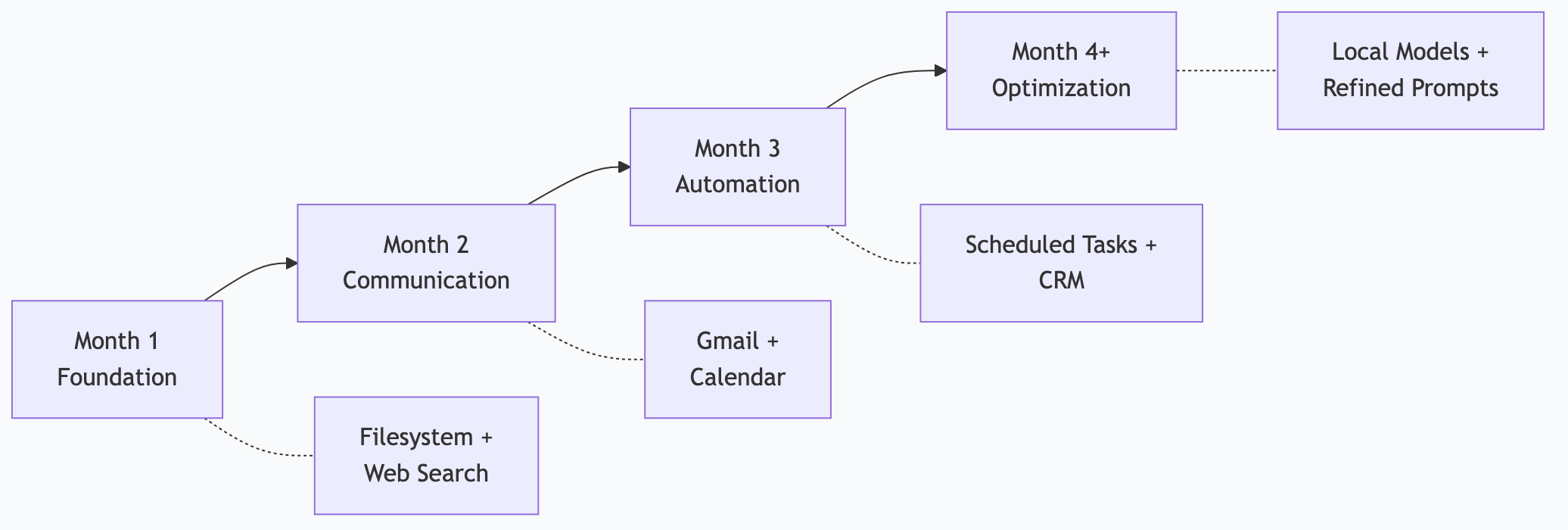
Month 1: Foundation
Set up filesystem + web search MCP servers
Use Claude for content repurposing (manual—you ask each time)
Track time saved vs. time spent
Month 2: Communication
Add Gmail MCP server
Start using email triage and draft responses
Add Google Calendar server for meeting prep
Month 3: Automation
Set up scheduled tasks (morning briefing via OpenClaw or n8n)
Create templates for recurring workflows
Add CRM or project management MCP server
Month 4+: Optimization
Refine prompts based on output quality
Add specialized servers for your industry
Consider local models (Ollama) to eliminate API costs
How I Actually Do This
I use MCP servers to run a content-first small business. Here's the actual pipeline:
Content Pipeline (1 Article → 25+ Pieces)
My ACA Council—five specialized AI agents—handles the full content lifecycle:
1. SCOUT finds trending topics and research material
2. FORGE generates structured outlines
3. QUILL writes the draft
4. LEDGER fact-checks and validates claims
5. MAVEN optimizes for SEO and generates distribution pieces
One article generates: the full blog post, SEO metadata, social posts for 5 platforms, a newsletter version, Substack Notes, a voiceover script, and graphic suggestions. All automated.
Morning Briefing (30 Minutes Saved Daily)
OpenClaw runs a morning briefing at 6:30 AM using local models:
Calendar summary (Google Calendar MCP)
Priority email scan (Gmail MCP)
Overnight log review (filesystem MCP)
Industry news (web search MCP)
Delivered to Discord before I finish my coffee. I read a 2-page summary instead of spending 30 minutes checking 4 different apps.
The Business Case
My entire automation stack runs on local models—$0/month in API costs. The Mac Studio hardware was a significant upfront investment, but you don't need that to start. A Mac Mini with 32 GB ($800) runs a morning briefing and content repurposing pipeline comfortably. That investment pays for itself in the first month of time savings.
Common Concerns
"What if the AI produces bad content?"
It will, sometimes. That's why every automation includes a review step. AI generates drafts; you approve or edit. The time savings come from not starting from a blank page—editing a draft is always faster than writing from scratch.
"I'm worried about data privacy."
MCP servers run locally on your computer. Your business data doesn't leave your machine unless you explicitly connect to cloud services. For maximum privacy, use local models through Ollama—then nothing touches the internet at all.
"My business is too niche for AI."
AI doesn't need to understand your niche deeply to save you time. Email triage, meeting prep, and content formatting are universal tasks. The AI handles the structure; you provide the domain expertise. That combination is powerful regardless of industry.
"I tried ChatGPT and it wasn't that helpful."
ChatGPT without MCP servers is limited to what you paste into the chat. With MCP servers, AI accesses your actual data—files, emails, calendars, web. The difference is dramatic. It's the difference between describing your schedule to someone and handing them your calendar.
Frequently Asked Questions
Which industries benefit most from MCP automation?
Any industry with significant knowledge work: professional services (law, accounting, consulting), real estate, marketing agencies, e-commerce, healthcare administration, education. The common thread is repetitive text-based tasks—email, documents, research, content.
Can I use MCP servers if I'm not tech-savvy?
Yes. The initial setup requires following step-by-step instructions (similar to installing any software). Once configured, you interact with AI using plain language. "Summarize my emails" is the interface—not code.
How do MCP servers compare to Zapier or Make?
Zapier and Make connect apps with if-then rules. MCP servers connect apps to AI with understanding. A Zapier automation moves data between apps in a fixed pattern. An MCP-connected AI reads, interprets, decides, and acts. They complement each other—use Zapier for simple triggers and MCP for intelligent processing.
What's the minimum investment to get started?
Claude Pro subscription: $20/month
Hardware: Your existing computer
Time: 30 minutes for initial setup
Total first-month cost: $20
Compare that to a virtual assistant ($500-2000/month) or a part-time employee ($1500+/month) for the same tasks.
Can my team share MCP server setups?
Yes. Configuration files can be shared and standardized across a team. Everyone gets the same MCP servers connected the same way, ensuring consistent AI capabilities across the business.
*This is part of the ASTGL Definitive Answers series—structured, practical answers to the questions people actually ask about AI automation, MCP servers, and local AI infrastructure.*