


Last week I said I was replacing Notion with a self-hosted AI agent running on a Mac Studio. Today I actually did it. The install took six hours, not the two I planned, and it included three problems that no documentation warned me about. The result is a working AI assistant named TARS that responds to both Slack and iMessage. All local. Zero cloud dependency.
Here’s how it actually went.
The Setup
The plan was straightforward. Install Ollama for local LLM inference, install OpenClaw as the agent framework, and wire up messaging channels, done. I’ve got a Mac Studio M3 Ultra with 256 GB of unified memory. Plenty of horsepower.
Should have been a two-hour job. It wasn’t.
Not because the tools are bad. They’re actually solid. But self-hosting AI means you’re the sysadmin, the DevOps team, and the QA department all at once. Every integration has its own auth model, its own quirks, and its own way of failing without telling you.
Three Problems Nobody Warned Me About
Three problems ate most of my afternoon, and none of them were in the documentation.
Problem 1: OpenClaw couldn’t authenticate with Ollama. The onboarding wizard created a config file, but the gateway runs as a macOS LaunchAgent. That’s a background service with its own environment. The API key I set in the config never reached the running process. I spent two hours reading bundled JavaScript source code before I figured it out. OpenClaw checks for an OLLAMA_API_KEY environment variable, and the LaunchAgent plist needed it injected directly.
<!-- The fix: add to ~/Library/LaunchAgents/ai.openclaw.gateway.plist -->
<key>OLLAMA_API_KEY</key>
<string>ollama-local</string>
The auth resolution chain goes: auth profiles.json first, then environment variables, then config apiKey. You won’t need to know that until you do.
Problem 2: iMessage needs two separate permissions. OpenClaw uses imsg, a CLI tool that reads the macOS Messages database. Granting Full-Disk Access to the node binary seems like it should be enough. It’s not. The imsg binary needs its own Full-Disk Access entry too. Two binaries, two permission grants. Miss one, and you get a cryptic “permissionDenied” on chat.db with no hint about which binary is the problem.
Problem 3: Slack’s event delivery broke silently. Socket Mode connected fine. The status page said everything worked. But zero messages came through. Turns out the first Slack app I created had corrupted internal state from toggling event subscriptions after initial setup. I deleted the entire app and recreated it from a YAML manifest with everything preconfigured. The second app worked immediately.
# The manifest that actually works
settings:
 event_subscriptions:
 bot_events:
 - app_mention
 - message.im
 socket_mode_enabled: true
The Sequence That Actually Works
Distilled from my trial and error so you don’t have to repeat it.
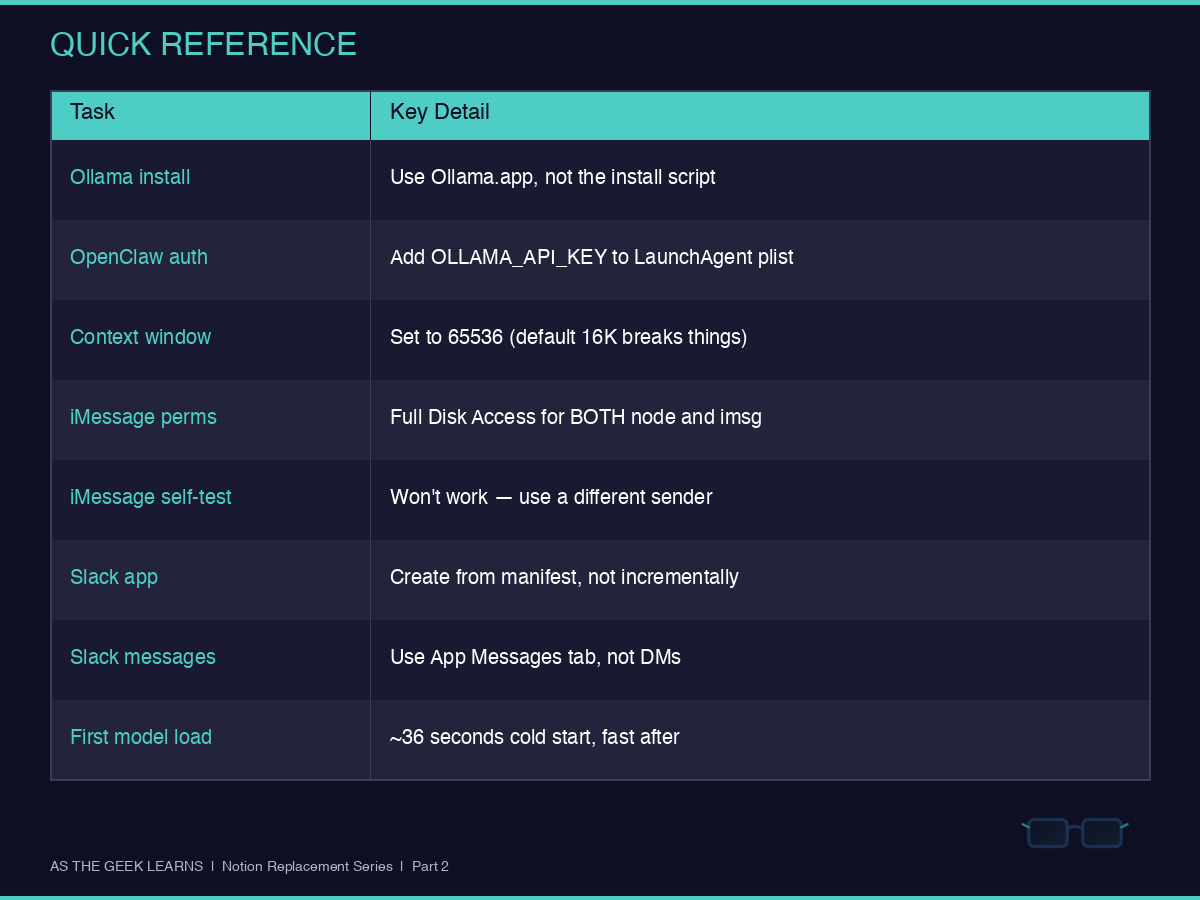
Ollama: Skip the install script. It needs sudo. Download Ollama.app, drag it to Applications, launch it. The CLI sets itself up automatically. Then pull your models. I’m running qwen3:32b as the primary (20 GB) with qwen3:8b as the fallback.
OpenClaw: Install via npm, run the onboarding wizard, then immediately edit the LaunchAgent plist to inject OLLAMA_API_KEY. Set contextWindow to 65536 in the config. The default 16K will break OpenClaw’s tool use, and you’ll get weird truncation errors with no obvious cause. Restart the gateway after every config change.
iMessage: Grant Full Disk Access to both /path/to/node and /path/to/imsg. Add allowed senders to channels.imessage.allowFrom in E.164 format (+1XXXXXXXXXX). Don’t try messaging yourself. Messages on the same device and Apple ID don’t trigger inbound events. Use a different phone to test.
Slack: Create your app from a manifest with Socket Mode and event subscriptions already configured. Don’t enable features one at a time through the UI. Generate the App-Level Token (xapp-...) with connections:write scope. Your messages arrive through the App’s Messages tab, not regular Slack DMs.
Why This Matters
Every one of these problems has the same root cause. Self-hosted tools don’t have managed infrastructure hiding the complexity from you. Notion works because someone else handles the auth, the message routing, and the permission grants. When you self-host, that someone is you.
Here’s what you get in return: a 32-billion-parameter language model running entirely on your hardware, responding in seconds, with zero data leaving your network. My wife texted my number, and TARS replied. I messaged it from Slack and got an answer. No API costs. No token limits. No third party reading my business documents.
(For the curious out there, TARS was named after the famous Interstellar TARS Marine robot and has the sarcasm as well)
First model load took 36 seconds. After that, responses come back fast. With 256 GB of unified memory, I could run models four times this size if I needed to.
Quick Reference
This is Part 2 of the Notion Replacement series. Part 1 covered why I’m making the switch.

Next up: Part 3, installing the document editor. Follow along at As The Geek Learns.