


I have an autonomous AI agent running on my Mac Studio. It has full shell access, reads my calendar, manages my tasks, and sends iMessages on my behalf. It runs 24/7 as a background service.
If that sentence doesn’t make you slightly nervous, you haven’t been paying attention. In February 2026, researchers found over 135,000 OpenClaw instances exposed to the public internet. A coordinated attack called ClawHavoc planted over a thousand malicious plugins in the community registry. Nine CVEs have been disclosed, including remote code execution.
I needed to take security seriously. Not “I changed the default password” seriously. Threat-model seriously.
MAESTRO: Seven Layers of Things That Can Go Wrong
The Cloud Security Alliance published a framework called MAESTRO—a 7-layer threat model specifically designed for agentic AI systems. Ken Huang mapped it directly to OpenClaw’s codebase, identifying 35+ specific threats across every layer of the stack.
Here are the seven layers, translated from security-paper language into “things that could actually ruin your day”:
Layer 1: Foundation Models: Someone sends your agent a crafted message that hijacks its behavior. Prompt injection. Jailbreaks. System prompt leakage. Your agent does what an attacker tells it to instead of what you told it to.
Layer 2: Data Operations: Your credentials are stored in plaintext JSON files. Your session logs contain every conversation forever. A malicious skill injects code through your workspace.
Layer 3: Agent Frameworks: The agent misuses its own tools. It runs shell commands it shouldn’t. It spawns sessions without authorization. It escalates its own privileges.
Layer 4: Deployment & Infrastructure: Your gateway is exposed to the network. Someone brute-forces the WebSocket token. A reverse proxy misconfiguration bypasses authentication entirely.
Layer 5: Evaluation & Observability: Nobody’s watching the agent for anomalous behavior. There’s no audit trail. Logs can be tampered with. If the agent starts acting weird, nothing catches it.
Layer 6: Security & Compliance: Your DM policy is misconfigured. Anyone can message the agent. Pairing codes can be brute-forced. Identity can be spoofed across channels.
Layer 7: Agent Ecosystem: A malicious plugin gets installed. A legitimate plugin’s npm dependency gets compromised. The skill registry serves poisoned packages.
The critical attack chain MAESTRO identifies: compromise the gateway (Layer 4) → access the session store (Layer 2) → poison conversation history (Layer 1) → control the agent (Layer 3) → spread via messaging (Layer 7).

Reading this was humbling. I’d addressed some of these by instinct during setup. Loopback binding, directory permissions, and pairing-based access control were all implemented. But “some” isn’t a security posture.
SecureClaw: The Audit
SecureClaw is an open-source security tool built specifically for OpenClaw by Adversa AI. It maps to MAESTRO, OWASP, MITRE ATLAS, and NIST AI 100-2. The install is a git clone and a bash script, no npm install, no network calls, and no surprises.
git clone https://github.com/adversa-ai/secureclaw.git
bash secureclaw/secureclaw/skill/scripts/install.sh
Then you run the audit:
bash ~/.openclaw/skills/secureclaw/scripts/quick-audit.shMy baseline score: 57 out of 100. Zero criticals. Three HIGHs. Three MEDIUMs. Eight checks passing.
Here’s what passed without any work:
• Gateway bound to loopback (127.0.0.1) not exposed to network
• Gateway authentication present
• Directory permissions set to 700 (owner only)
• No browser relay exposed
• DM policy set to pairing (not open)
• Skills clean of malicious patterns
And here’s what failed:
🟠 HIGH Plaintext key exposure: Keys in openclaw.json and 5 backup files
🟠 HIGH Sandbox mode: commands run directly on host
🟠 HIGH Exec approval mode: agent acts without human approval
🟡 MED No cognitive file baselines: can’t detect tampering
🟡 MED Default control tokens: vulnerable to spoofing
🟡 MED No failure mode: no graceful degradation
The Hardening
Step 1: Clean up credential leaks. OpenClaw creates .bak files every time you change config. Each backup contains your full config, including Slack tokens and API keys. I had five of them sitting in the OpenClaw directory. Deleted them all. Set the main config to 600 permissions.
This is the kind of thing that’s easy to miss and catastrophic to ignore. A single ls -la ~/.openclaw/ would show them. But who runs ls -la on their config directory after every change?
Step 2: Create integrity baselines. SecureClaw’s hardener generates SHA256 hashes of your “cognitive files” IDENTITY.md, AGENTS.md, and HEARTBEAT.md. These are the files that define who your agent is and what it does. If an attacker or a hallucinating agent modifies them, the nightly integrity check will catch it.
bash ~/.openclaw/skills/secureclaw/scripts/quick-harden.shStep 3: Exec approvals. This is the big one. MAESTRO recommends human-in-the-loop approval for all shell commands. But my agent runs morning briefings and heartbeat checks on cron—unattended. Setting approvals to “always” would break all automation.
The solution: an allowlist with on-miss approval. I created ~/.openclaw/exec-approvals.json with 17 safe command patterns: imsg, calctl, apple-reminders, cairn, and basic file operations. Tars can run these freely. Anything else; curl, rm, pip install, or any command not on the list, requires human approval.
{
  “defaults”: {
    “security”: “allowlist”,
    “ask”: “on-miss”
  },
  “agents”: {
    “main”: {
      “allowlist”: [
        { “pattern”: “imsg *”, “note”: “iMessage send/read” },
        { “pattern”: “calctl *”, “note”: “Apple Calendar” },
        { “pattern”: “cairn *”, “note”: “Task management” }
      ]
    }
  }
}
This is the trade-off MAESTRO doesn’t talk about: security versus automation. Maximum security means every action needs approval. Maximum automation means the agent acts freely. The allowlist is the middle ground. Routine operations are pre-approved, and novel or dangerous operations require a human.
Step 4: Full plugin install. Beyond the bash scripts, SecureClaw has a full npm plugin with 56 runtime audit checks, background monitors for config drift, and real-time integrity verification. Installing it required building from source (TypeScript → JavaScript) and registering it with OpenClaw’s plugin system.
openclaw plugins install -l /path/to/secureclaw

openclaw config set plugins.allow ‘[”secureclaw”]’
That plugins.allow line is important. By default, OpenClaw will auto-load any discovered plugin. Explicit trust means only plugins you’ve approved get loaded.
Step 5: Nightly audit cron. A macOS LaunchAgent runs the full audit suite every night at 2 AM which includes quick-audit, integrity check, and supply chain scan. Results go to secureclaw-audit.log. If something changes overnight, it shows up in the morning.
The Final Score
After hardening: 64 out of 100. Nine checks passing. Zero criticals. The three remaining HIGHs are documented, accepted trade-offs:
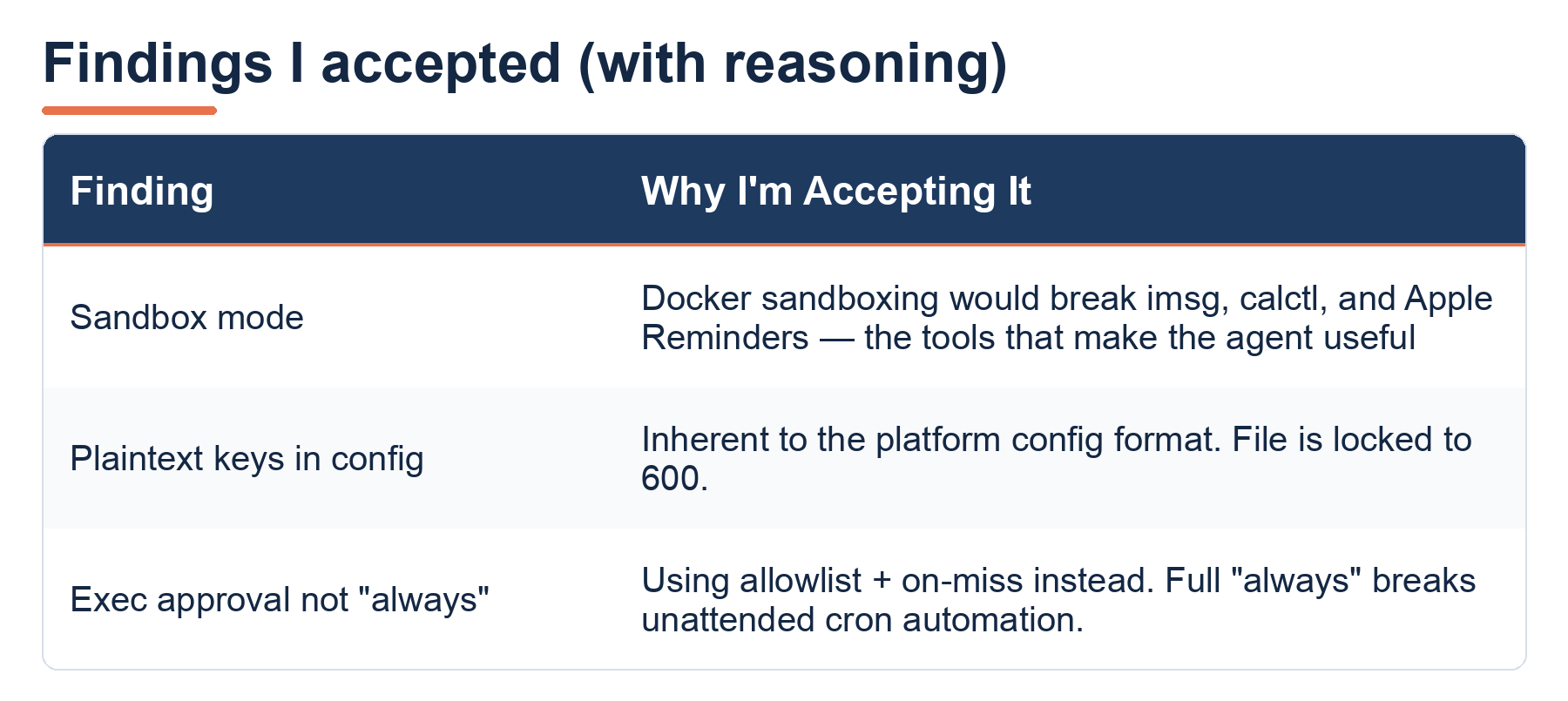
Findings I accepted (with reasoning)—Sandbox mode (Docker sandboxing would break imsg, calctl, and Apple Reminders); Plaintext keys in config (inherent to the platform config format, file is locked to 600); Exec approval not “always” (using allowlist + on-miss; full “always” breaks unattended cron automation).
The two MEDIUMs, control token customization and failure mode configuration, aren’t supported in OpenClaw v2026.3.2’s config schema yet. SecureClaw checks for them proactively. They’ll be fixable when OpenClaw adds the config options.
What I Actually Learned
Security isn’t a feature you enable. It’s a series of trade-offs you make with your eyes open. Sandbox mode is “more secure” but breaks the tools that make the agent useful. Approval mode “always” is “more secure” but kills the automation that makes the agent worthwhile. The right security posture isn’t maximum restriction; it’s documented, intentional decisions about what risks you accept and why.
Automated scanning is essential but insufficient. SecureClaw’s audit caught things I would have missed, including the .bak files with credentials, the missing integrity baselines, and the open exec policy. But the HIGHs it flagged as failures are things I’ve consciously accepted. No scanner can evaluate your specific trade-offs.
The biggest threat isn’t external. In my setup (loopback-bound, pairing-gated, allowlist-filtered), the most likely security failure isn’t a network attacker. It’s a malicious skill, a compromised npm package, or the agent itself hallucinating destructive actions. Layer 7 (ecosystem) and Layer 1 (model behavior) are the real attack surfaces for a local-first setup. The exec approval allowlist is my primary defense for both.
Clean up after yourself. OpenClaw creates backup files containing credentials on every config change. There’s no auto-cleanup. If you’re running OpenClaw, go check your directory right now: ls ~/.openclaw/*.bak*. You might be surprised.
Quick Reference
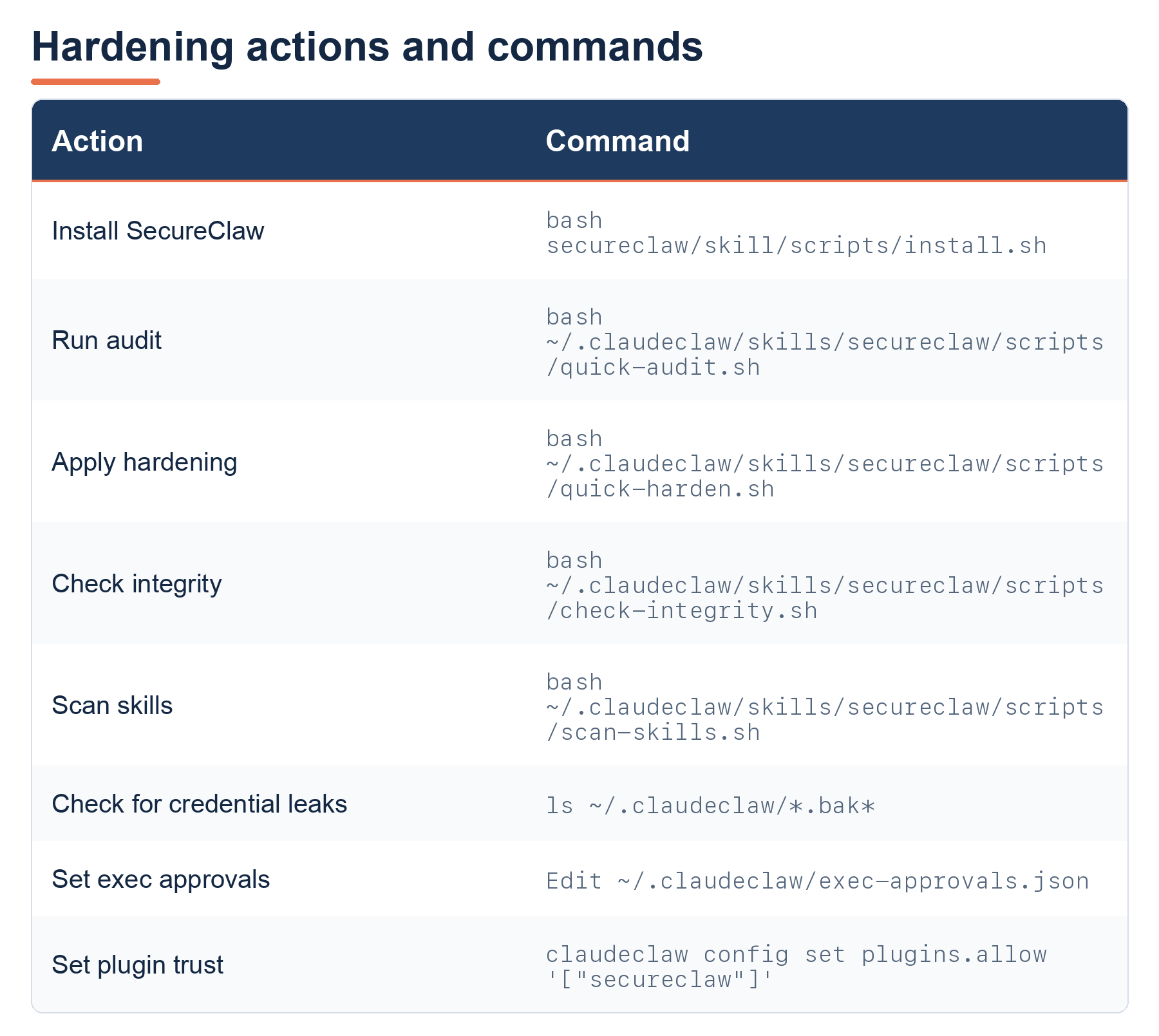
Hardening actions and commands: install, run audit, apply hardening, check integrity, scan skills, check for credential leaks, set exec approvals, set plugin trust. Commands target ~/.openclaw/skills/secureclaw/scripts/. Full command details in the image.
Update—June 2026: What I Actually Did When I Moved to ClaudeClaw
I wrote this piece in March, when OpenClaw was still the thing running my Mac Studio. By the end of April, I’d shut it down. Disabled the cron jobs, quarantined the LaunchAgents, and rebuilt the whole stack on the Claude Agent SDK. Based off of ClaudeClaw from the Early AI-Dopters AI learning group. The full post-mortem on why:

Why? The short version is this: I couldn’t see into OpenClaw. Which, if you scroll back up, is Layer 5: Evaluation & Observability, the exact layer this audit was weakest on.
You may wonder whether I just copied the 7-layer hardening over to the new stack. I didn’t, and I want to be honest about that. I did not port MAESTRO one-for-one. SecureClaw was written specifically for OpenClaw. Some of its thinking transferred; some of it didn’t. And the threat model itself moved on (more on that at the end). What the seven layers became was a checklist: for each one, how does the new architecture answer this? Here’s the scorecard.
The two layers that changed the most.
Layer 5 (Observability) went from my single biggest weakness to the entire reason ClaudeClaw exists. There’s now a dedicated agent, WATCHMAN, running seven probes every hour: failed tasks, stuck tasks, missed scheduler slots, daemon liveness, content-pipeline health, hidden failures (it greps the success logs for crash text), and delegation crashes. More importantly, there’s a second healthcheck running as a separate LaunchAgent with its own keychain-backed alert token. If the main daemon dies, the thing that tells me about it is still alive. The rule I wrote for myself out of this: the watcher cannot share fate with the watched. There’s also a behavioral dashboard, DefenseClaw, sitting on 127.0.0.1:3141.
Layer 3 (Agent Frameworks) is where my OpenClaw work actually carried forward. The exec-approvals allowlist from Step 3 above is the direct ancestor of what ClaudeClaw does now, except the enforcement dropped down a level. The first thing I shipped was killing bypassPermissions (the main agent had been running with permission checks disabled, which means a compromised agent has unlimited tool access. The SDK was no ceiling at all), switching to the SDK’s default permission mode, and handing the main agent a 15-tool allowlist as the single source of truth. Same idea as the OpenClaw allowlist. Enforced by the SDK itself instead of a config file I had to maintain.
The rest mapped like this:
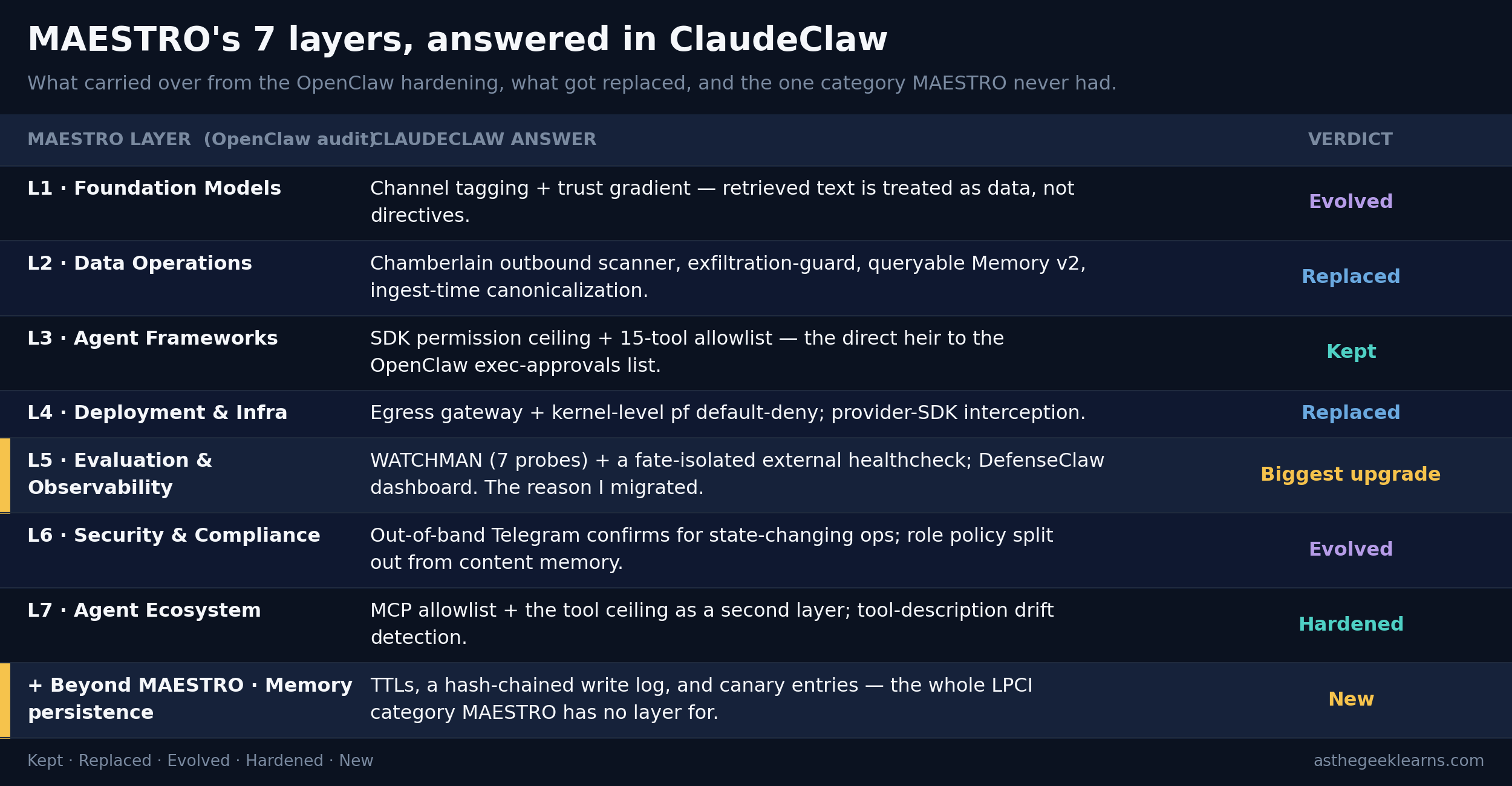
How each of the seven MAESTRO layers from the OpenClaw audit is answered in ClaudeClaw.
Layer 1 Foundation Models: channel tagging and a trust gradient that treats retrieved text as data, not directives (evolved).
Layer 2 Data Operations: Chamberlain outbound scanner, exfiltration-guard, queryable Memory v2, and ingest-time canonicalization (replaced and extended).
Layer 3 Agent Frameworks: SDK permission ceiling and a 15-tool allowlist, the direct successor to the OpenClaw exec-approvals list (kept, moved into the SDK).
Layer 4 Deployment and Infrastructure: an egress gateway plus kernel-level pf default-deny (replaced).
Layer 5 Evaluation and Observability: WATCHMAN’s seven probes and a fate-isolated external healthcheck, the biggest upgrade.
Layer 6 Security and Compliance: out-of-band Telegram confirmation for state-changing actions and a role policy kept separate from content memory (evolved).
Layer 7 Agent Ecosystem: an MCP allowlist plus the tool ceiling as a second layer (kept and hardened).
Plus a new row beyond MAESTRO. Memory persistence: TTLs, a hash-chained write log, and canaries.
Where the 7-layer model ran out.
MAESTRO is a static threat model. It’s a map of what can go wrong at each layer, frozen in time. What it doesn’t have a layer for is persistence. An attack that lands quietly in your agent’s memory or vector store and just waits. My scheduler re-enters context every 60 seconds, which means anything dormant in memory fires on a clock. That’s a different class of problem, and it has a name now: LPCI, Logic-layer Prompt-based Conditional Injection. Hardening against it (I am planning a separate two-part write-up on As The Geek Learns) meant building things MAESTRO never asked for, including a canonicalizer that decodes payloads before they reach the vector store, channel-tagged prompts so the model knows retrieved text is data and not instructions, memory TTLs, a hash-chained write log, and canary entries that page me if memory ever leaks into output.
What I gave up and what I kept. The honest cost of the move: I lost local-first. OpenClaw ran on Ollama, fully offline; ClaudeClaw talks to Anthropic’s API. I still own every byte of my data; it’s all on my SSD; I just don’t own the weights anymore. What carried over intact was the philosophy this whole series is built on: every document is a file I can grep, every config is version-controlled, and every decision has a session note. That part never changed.
This is Part 5 of the Notion Replacement series. We went from “install an AI agent” to “secure it against a 7-layer threat model” in two days. Follow along at As The Geek Learns.


