



A study tool learns about you while you learn the subject. It sees your reading, your questions, your wrong answers, and the concepts you keep missing. That history can be more personal than the textbook you uploaded.
So the real question in this comparison is who holds that history. StudyDeck keeps it on your machine. Google's notebook product takes away the work of running your own learning system. Both are reasonable answers.
StudyDeck is built on Open Notebook, which handles sources, notes, and podcast generation. StudyDeck adds a study workflow on top: curriculum tracking, recorded attempts, mastery estimates, and scheduled review.
First, the name. Google renamed NotebookLM to Gemini Notebook in July 2026. Notebooks also work inside the Gemini app, but the two interfaces behave differently. I'm comparing against the standalone product and flagging the Gemini app where it changes the answer. Google's announcement
A disclosure. StudyDeck is my personal study project, so I have a stake here. What I checked, on September 23, 2026, is StudyDeck's current code and Google's documentation. I didn't run a controlled trial of retention, answer accuracy, or generation speed. Nothing here shows that either product makes anyone learn faster.
Say you're learning AI engineering. You have a book, some documentation, a few lectures, and a pile of questions you can't answer yet. First you need help understanding the material. Then you need to find out what you can explain without help.

Gemini Notebook is good at that first part. You add PDFs, websites, YouTube videos, audio, and Google documents, then ask questions and get answers that cite your sources. Study guides, mind maps, and audio overviews give you several ways into material you don't know yet. If setup would eat your whole study session, start here. Supported learning workflows
Calling Gemini Notebook a passive summary machine would be unfair. Its quizzes and flashcards have difficulty controls and explanations. Flashcards remember your progress, let you revisit the cards you missed, and download as CSV. Flashcards and quizzes
StudyDeck is built around a longer sequence. The current schedule runs a pretest, then reading, then drawing a concept map from memory, then practice, then retrieval again later. Curriculum and concept progress live in local files. The cockpit records attempts and study-stage events as separate entries, so work you didn't finish yesterday still shows as unfinished today.
For in-depth study, I think this is the biggest difference between the two tools. StudyDeck has spaced repetition built in. Every quiz question you miss becomes a flashcard. A new card first shows up in the topic's next flashcard session, on day 7, 14, or 30 of the plan. After that, each correct answer widens the gap: 3 days, then 7, 14, and 30. Miss it and the card comes back tomorrow.
That schedule rests on one of the most replicated findings in learning research. Spreading practice out over time beats cramming the same amount of practice into one sitting. A 2006 review pooled 839 comparisons from 317 experiments and found that spaced study produced better long-term retention than massed study. Cepeda et al., Psychological Bulletin, 2006
Pulling the answer out of your own memory matters as much as the timing. In one experiment, students who practiced recalling a passage remembered more of it a week later than students who spent the same time rereading it. Roediger and Karpicke, Psychological Science, 2006: A 2013 review of ten common study techniques gave its highest rating to only two: spacing practice out and testing yourself. Dunlosky et al., Psychological Science in the Public Interest, 2013
The brain research points the same way. A 2016 neuroscience review found spaced training beats massed training for many kinds of human learning and in nearly every animal model tested. One leading explanation, consolidation theory, holds that spaced sessions stabilize a long-term memory more efficiently than back-to-back repetition. The working idea is that the gaps give the brain time to move material from short-term into long-term memory, and each well-timed review strengthens it. Smolen, Zhang, and Byrne, Nature Reviews Neuroscience, 2016
Gemini Notebook's flashcards remember your progress and let you revisit the cards you missed, but I didn't find documentation of a schedule that spreads reviews out over days. You decide when to come back. For a quick refresher, that's fine. For material you need to keep for months, the built-in schedule is why I consider StudyDeck the better tool. One caveat: the research supports spacing as a technique. It doesn't prove StudyDeck's particular 1, 3, 7, 14, 30 table is the best one, and I haven't measured my own retention with it.
One constraint in the quiz flow is deliberate. StudyDeck won't show you the answer until it has recorded your attempt. Self-graded items stay pending until you finalize them. What you get is an honest record of what you answered before you saw the solution, and that ordering is the point. The confidence and mastery numbers are still software estimates, not validated measurements of understanding.
Google documents progress tracking inside its study aids. I didn't find documentation for anything like StudyDeck's full curriculum and event history that you can open and read. That's a narrower claim than "Google has no progress tracking," and I want to keep it narrow.
StudyDeck can also turn a notebook into video, in two ways. The first runs entirely on your machine. The local language model writes a narrated slide overview, the Kokoro voice model, running through Speaches, reads the narration aloud, and rsvg-convert and FFmpeg renders the slides and audio into an MP4. You can leave the page while it renders, and the finished video shows up on the Videos shelf.

The second path uses Higgsfield AI for generated footage, and StudyDeck deliberately stops short of calling it. The local model drafts a storyboard of three to five scenes, each with narration, a visual prompt, and references to your sources. That step spends no Higgsfield credits and sends nothing anywhere. You check the references, edit the prompt, copy it, and open Higgsfield yourself, where you see the model, what you're sending, and the price before anything generates. Save the downloaded MP4 under the filename StudyDeck suggests, and it joins the same shelf. StudyDeck never submits or retrieves a Higgsfield job on its own, and that manual step is the privacy boundary.
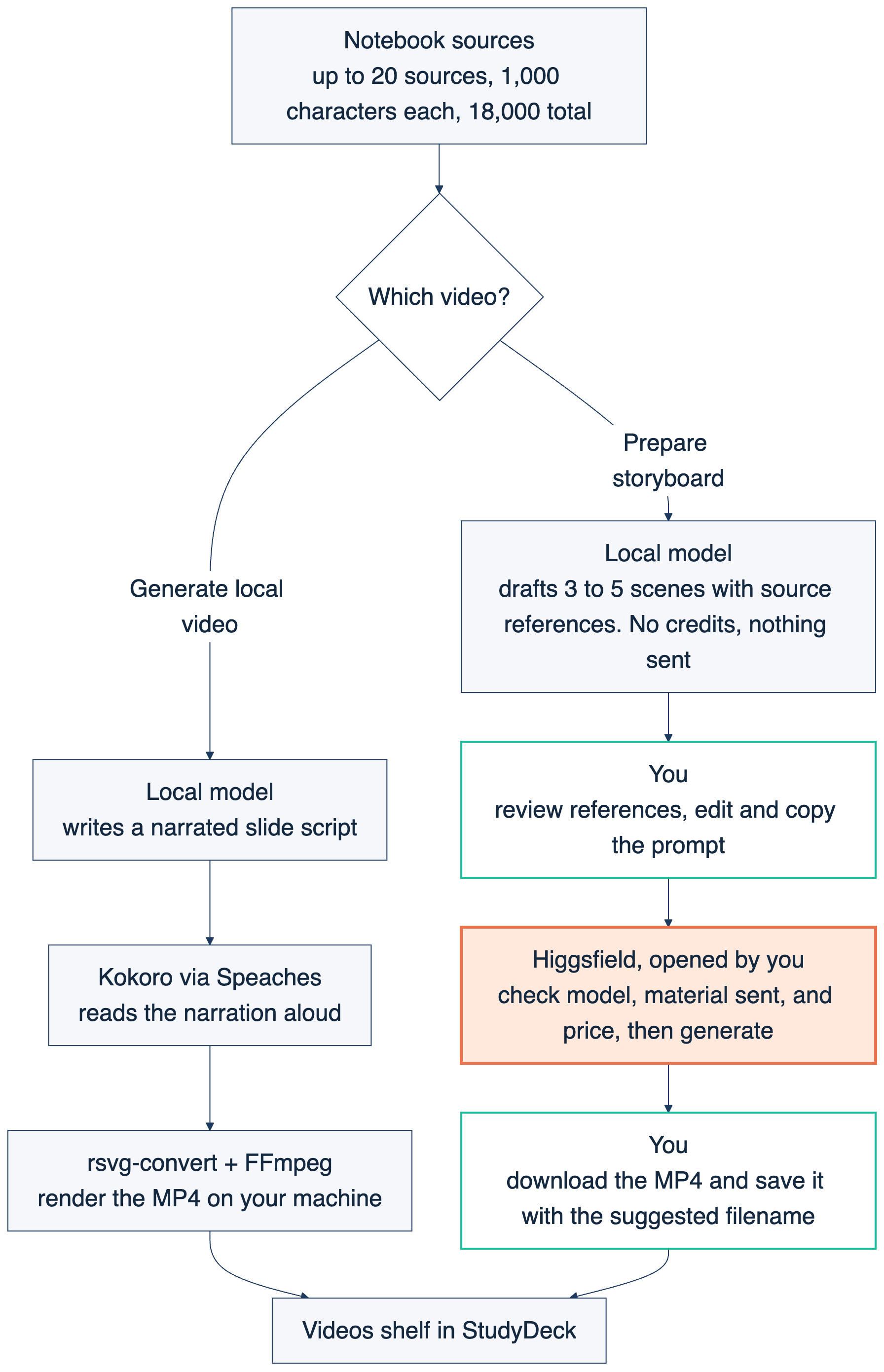
Both paths start from the same limited input: up to 20 sources, at most 1,000 characters from each and 18,000 in total. What comes out is a short orientation to a topic, not a full lesson. StudyDeck checks that every source a script cites actually exists in the notebook. That proves the reference is real, not that the narration got the source right. Local videos don't have captions yet.
Privacy is where local control pays off, and the payoff is specific. As configured, StudyDeck's cockpit listens on your local machine. Curriculum files, attempts, and review records sit there too. Run Open Notebook, Ollama, and the speech services locally, and the system can process your study material without sending it to a hosted model provider.

So a wrong explanation or a page of private notes doesn't have to become a request to a cloud service. You hold the files, and you can read the code that handles them. You pick the model and decide which services see anything. If you're studying internal technical documents or personal material you're allowed to process locally, that control may settle the choice by itself.
Read Google's policy closely, because the details matter. Gemini Notebook says it doesn't directly train its foundational models on your notebook content unless you send feedback. For consumer accounts, feedback can include the associated sources and conversations, can get human review, and can be kept for up to three years. Workspace and Education accounts get different terms. Google says their uploads, queries, and responses aren't used for model training or reviewed by humans, even when they send feedback. Privacy policy
Those protections are real. Your material still sits on Google's infrastructure and gets processed there. Running locally avoids that one transfer. It doesn't make your computer secure.
Using notebooks through the Gemini app changes things again. Google says the standalone notebook grounds its answers in your notebook sources, while the Gemini app can also use web search and other tools. Chats in Gemini fall under the Gemini Apps privacy rules, and turning off Gemini's activity setting doesn't delete your notebook data. Which interface you open decides which rules apply. Cross-app behavior and data use
StudyDeck isn't sealed either, and I'd rather name the exits. Internet search sends queries and page requests off your machine. If a cloud agent builds your curriculum, your material goes through that agent's provider. The providers you configure in Open Notebook decide where its requests go. And the Higgsfield handoff sends whatever you paste into Higgsfield, under Higgsfield's terms.
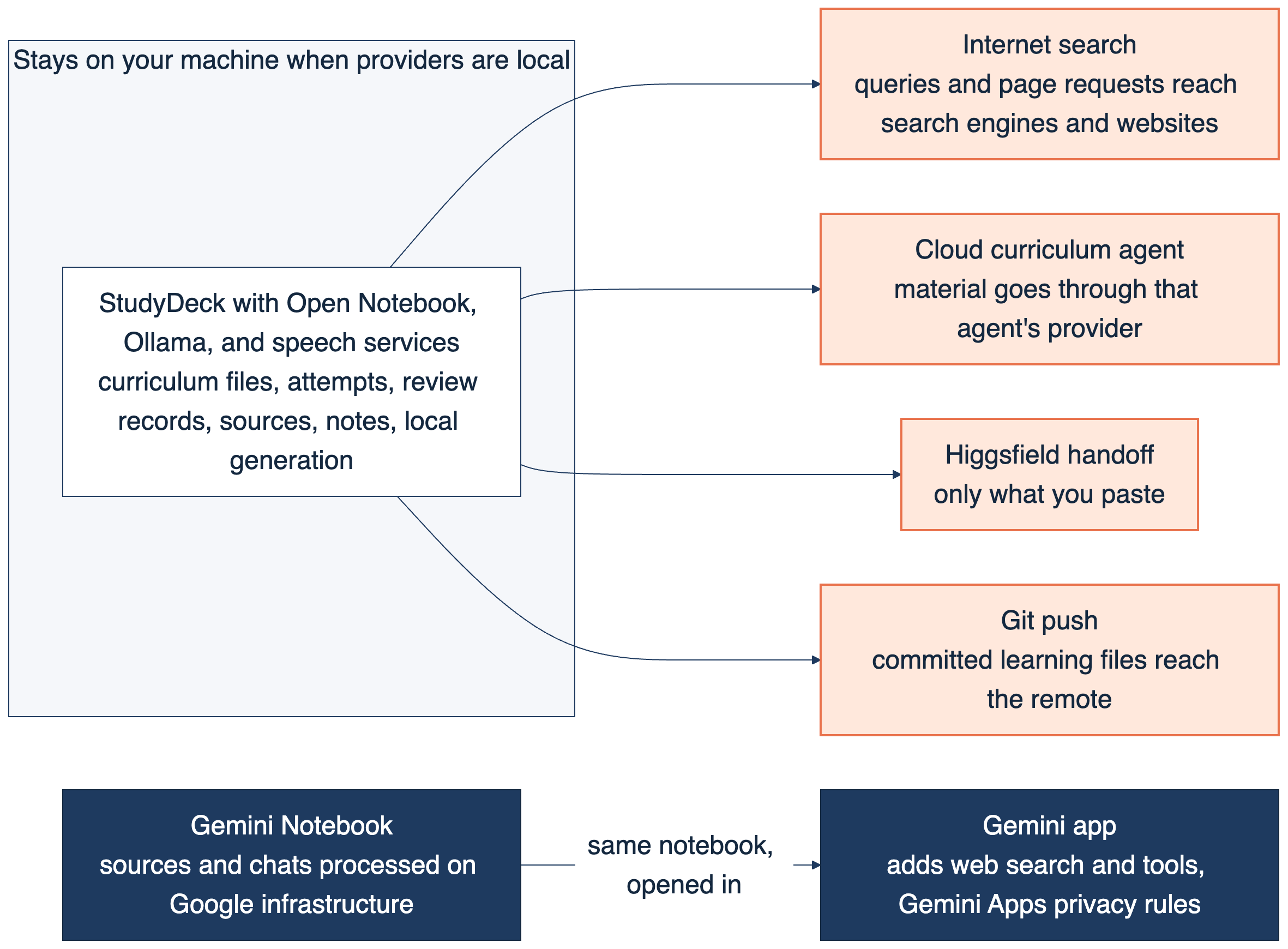
Learning files are committed to Git in this project, so a push can send them to a remote repository. Generated media and the Open Notebook database need their own backups. Owning it locally also makes you responsible for device security, access, and recovery. And I read the source code, not network traffic, so treat this as a code review rather than an audit of a running install.
Here's how I'd weigh it.
StudyDeck's pros
With local providers, your source material and learning history stay on your own machine.
You can read and change the curriculum, scheduling rules, model choices, and records instead of waiting for a vendor to ship a feature.
Recorded attempts and explicit completion events separate time spent studying from work you actually finished.
Built-in spaced repetition turns every missed question into a flashcard. The card first comes up at the topic's next flashcard session, then returns on a widening 3, 7, 14, and 30 day schedule as you keep getting it right.
Practice can include real coding files, and the workflow brings you back to weak concepts across sessions.
StudyDeck's cons
It's a personal, single-user system. Setup and maintenance take real technical time.
The cockpit itself needs no runtime packages, but the full setup needs other services, model storage, and suitable hardware. Local inference costs memory, electricity, and time.
Creating a notebook doesn't build its curriculum automatically. File uploads still go through Open Notebook's separate interface.
Videos are short orientations built from limited excerpts. Local ones have no captions yet, Higgsfield footage takes a manual copy-and-download round trip, and a valid source reference doesn't prove the narration is correct.
Gemini Notebook's pros
Managed infrastructure means little setup, and source-linked answers make it practical to check an explanation.
Quizzes, flashcards, and several overview formats cover different study activities in one product.
The mobile app supports study aids and downloaded audio for offline listening. That's a clear win over StudyDeck's local web cockpit. Mobile capabilities
Notebook sharing lets you study with other people, subject to account and content restrictions. StudyDeck has no managed collaboration service to compare. Notebook sharing
Gemini Notebook's cons
Cloud processing means trusting the provider's policies and account controls with your material.
Usage limits can interrupt a study session. Google started rolling out compute-based limits on September 2, 2026, and paid plans raise the allowance. Check the current terms, not older daily quota tables. Current limits
You have less control over the model, the application logic, and the long-term study workflow than you would with software you can modify.
Generated explanations and study aids can be wrong. Citations help you investigate, but they don't replace reading the source. Google says as much in its mobile documentation.
If the material is public and you need to study today, I'd start with Gemini Notebook. Convenience counts for a lot when maintaining local services could become your excuse to avoid the subject.
For a long-running personal curriculum, especially one with private notes and a detailed record of how you're doing, StudyDeck gives you more ownership. You pay for it in maintenance, and the privacy benefit holds only while the relevant providers stay local.
You can also mix them. Use Google's tools for public material and keep private reflections and assessment history local. Decide where that line sits before you copy a document or connect another service. Then close both tools and test yourself. Explain the subject, or solve a problem you haven't seen, without help.

Frequently Asked Questions
Is Gemini Notebook the same thing as NotebookLM?
Yes. Google renamed NotebookLM to Gemini Notebook in July 2026. The standalone product continues, and notebooks also work inside the Gemini app, but the two interfaces behave differently for grounding and privacy. (source)
Does Google train its AI models on my Gemini Notebook documents?
Gemini Notebook says it doesn't directly train its foundational models on your notebook content unless you send feedback. For consumer accounts, feedback can include your sources and conversations, get human review, and be kept for up to three years. Workspace and Education accounts get different terms. (source)
Can I use Gemini Notebook offline?
Partially. The mobile app supports downloaded audio overviews for offline listening, which is useful for commute-time review. That's offline playback of something already generated online, not offline AI generation Gemini Notebook itself needs a connection to process new material. (source)
Does Gemini Notebook have usage limits that can interrupt a study session?
Yes. Google started rolling out compute-based usage limits on September 2, 2026 (announcement), with paid plans raising the allowance. Exact quotas vary by account and plan, so check the current terms rather than older daily-limit numbers you may find elsewhere. (source)
What is StudyDeck?
StudyDeck is a personal, local-first study tool built on top of Open Notebook. It adds curriculum tracking, recorded quiz attempts, mastery estimates, and spaced-repetition flashcard review on top of Open Notebook's source and note handling.
Is StudyDeck actually private?
As configured, with Open Notebook, Ollama, and the speech services all running locally, StudyDeck's cockpit and its curriculum, attempt, and review files stay on your own machine. That protection holds only as long as every provider you configure stays local. Internet search, a cloud curriculum agent, or the Higgsfield handoff all send data off-device.
Can StudyDeck make a video from my study notes without sending anything to the cloud?
Yes, on one of its two paths. The fully local path uses a local language model, the Kokoro voice model through Speaches, and rsvg-convert plus FFmpeg to render narrated slides into an MP4 entirely on your machine. The Higgsfield path is separate, spends no credits until you manually open Higgsfield yourself, and is never submitted automatically.
Which one should I use if I need to study today?
If the material is public and time is tight, Gemini Notebook's managed setup gets you started faster. For a long-running personal curriculum with private notes and a detailed history of how you're doing, StudyDeck trades setup time for more ownership of that history.