


The Problem That Started It All
If you publish on Substack, you’ve probably discovered their dirty little secret: you can schedule newsletter posts, but you can’t schedule Notes. Substack Notes, their Twitter/X competitor baked into the platform, requires you to be there, fingers on keyboard, posting at exactly the right moment.
The market noticed this gap fast. Chrome extensions like Writestack and Finn Tropy’s Scheduler popped up, charging $25-50 for scheduling functionality. But here’s what drove me up the wall: every single one requires your browser to stay open 24/7.
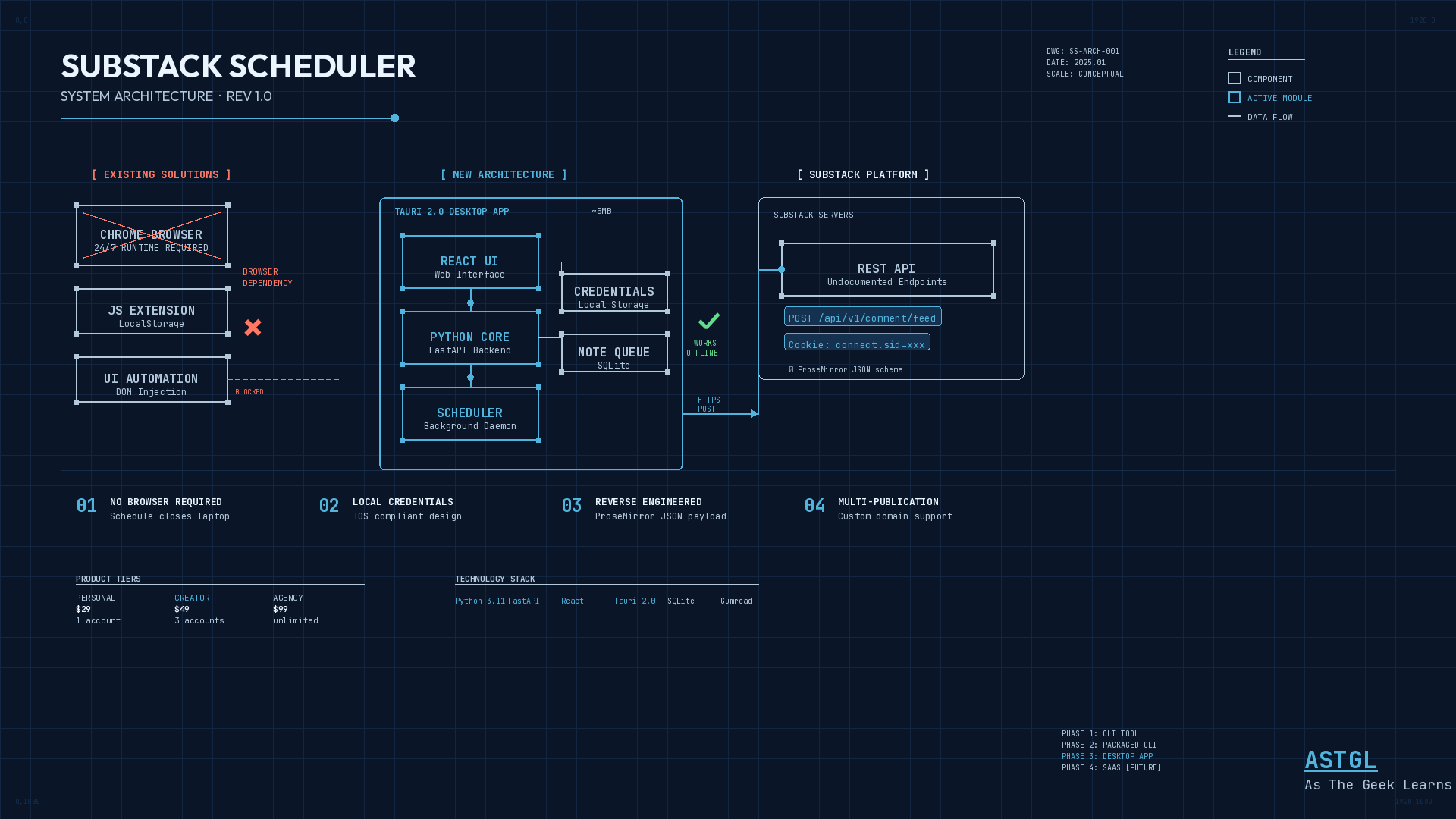
Why? Because they’re not calling APIs at all. They inject JavaScript into Substack’s web page, fill in the note composer programmatically, and literally click ‘Post’ for you at the scheduled time. Close your laptop lid, and your scheduled posts vanish into the ether.
For someone who’s spent 25 years building enterprise automation, this felt like an affront to my professional sensibilities. There had to be a better way.
Understanding the Existing Landscape
Before writing any code, I needed to understand what I was dealing with.
How Browser Extensions Actually Work
The existing Chrome extensions all follow the same pattern: they inject JavaScript into the Substack Notes page, use your active browser session for authentication, store scheduled notes in Chrome’s LocalStorage, and then programmatically fill the composer and click ‘Post’ when the time comes.
The browser has to stay open because they’re automating the UI, not calling APIs directly. That’s a fundamental architectural limitation, not a feature gap they forgot to address.
The Substack “API” Discovery
Substack has no official public API. That’s intentional. They want to control the platform experience. But their web application has to communicate with servers somehow, and that ‘somehow’ is a set of internal REST endpoints.
The key insight came from digging into network traffic: these internal endpoints can be called directly if you have the right session cookie (connect.sid). This cookie gets issued when you log in and typically lasts weeks or months.
The Terms of Service Question
Before investing serious time, I needed to understand the legal landscape. Digging through Substack’s TOS and existing extension documentation surfaced one critical insight:
“Substack terms and conditions prevent any system that would require you to disclose your credentials, so no external servers or services can be used for sending Notes.”
This has major implications. Personal tools you build for yourself? Completely fine, since you’re using your own credentials. CLI tools that users run locally? Fine, because credentials stay on their machine. Desktop apps? Also fine, with credentials stored locally. A SaaS service where you handle user credentials on your servers? That’s where you run into problems.
This shaped the entire product direction: a desktop app with local credential storage hits the sweet spot for commercial viability without TOS issues.
Architecture Decision: Python CLI as Foundation
Given my automation background and the goal of eventually building a commercial product, I went with Python for the core logic.
Why Python?
The syntax feels familiar coming from PowerShell. The HTTP libraries are excellent, and requests is perfect for this kind of work. It runs anywhere: Mac, Linux, Windows, Raspberry Pi, and cloud VMs. Quick iteration with no compile step. And the packaging story is solid. The same code can become a CLI tool, then a desktop app.
The Evolution Path I Mapped Out
Phase 1 would be a personal script, just Python and cron for my own dogfooding. No TOS risk. Phase 2, a packaged CLI tool I could sell as a one-time purchase for $20-50. Low TOS risk. Phase 3, a Tauri-wrapped desktop app, either one-time or subscription. Still low risk. Phase 4 would be a full SaaS service with cloud and browser automation and a subscription model but higher TOS risk.
The decision became clear: build a desktop app where users keep their own credentials locally. This respects the TOS while providing a professional user experience.
The Desktop Framework Decision: Tauri vs. Electron
For wrapping a web UI into a desktop app, two main contenders exist: Tauri and Electron.
Tauri produces binaries around 3-10 MB with lower memory usage since it uses the system webview. Faster startup, Rust backend. Version 2.0 is stable. Electron produces 150-200 MB binaries with higher memory usage because it bundles Chromium. Slower startup, Node.js backend, but extremely mature.
Decision: Tauri 2.0
Size matters for distribution. 5 MB versus 150 MB affects download perception. And ‘lightweight & fast’ becomes a selling point for a utility app. The Rust backend would auto-start the Python scheduling daemon as a sidecar process.
API Reverse Engineering: The Technical Foundation
Before building anything, I needed to prove the core posting logic would actually work.
Step 1: Cookie Extraction
Getting the session cookie requires a one-time manual step. Open Chrome DevTools (Cmd+Option+I), go to your Substack publication’s Notes page, switch to the Network tab, post a test note manually, then find the POST request and copy the cookie string.
Step 2: Endpoint Discovery
Based on online research, I expected the Notes endpoint to be:
POST /api/v1/notes.It isn’t.
After network trace analysis, I discovered Notes are actually posted via:
POST https://{publication-domain}/api/v1/comment/feedThe naming makes sense once you understand Substack’s architecture: Notes evolved from their commenting system. They literally are ‘comments on your own feed.’
Step 3: Custom Domain Discovery
If you have a custom domain (like resistandrise.blue or astgl.com), API calls go to that domain, not substack.com. Critical for multi-publication support.
Step 4: Payload Structure
Substack uses ProseMirror for content. The JSON structure wraps your text in a doc with a schema version, containing paragraphs with text nodes. There’s also a replyMinimumRole field set to ‘everyone.’
The Product Vision
With research complete, I had a clear picture.
Target User:
Substack creators who want to schedule Notes without browser dependencies
Core Value Proposition:
Schedule Notes days, weeks, or months in advance. Runs in the background with no browser required. Works offline and posts when you’re back online. Multi-account support for creators managing multiple publications.
Pricing Model (One-time purchase, tiered):
Personal at $29 for 1 account. Creator at $49 for 3 accounts. Agency at $99 for unlimited accounts.
Technology Stack:
Python backend using FastAPI for the API and scheduling daemon. React frontend for the web-based UI. Tauri desktop wrapper to package everything together. Gumroad for payment and licensing.
What’s Next
With the research complete and architecture planned, Part 2 covers actually building the thing, from proof-of-concept CLI to polished desktop application.
Have you used an AI to help you research and build an app? I’d love to hear your experiences. Leave comments or questions. I will answer every one. — The Geek