


You've probably used AI to answer questions or draft emails. But what if AI could handle entire workflows—research, decide, act, report—while you focus on something else?
That's what AI agents do. And you can start building them today with tools you already have.
The Short Answer
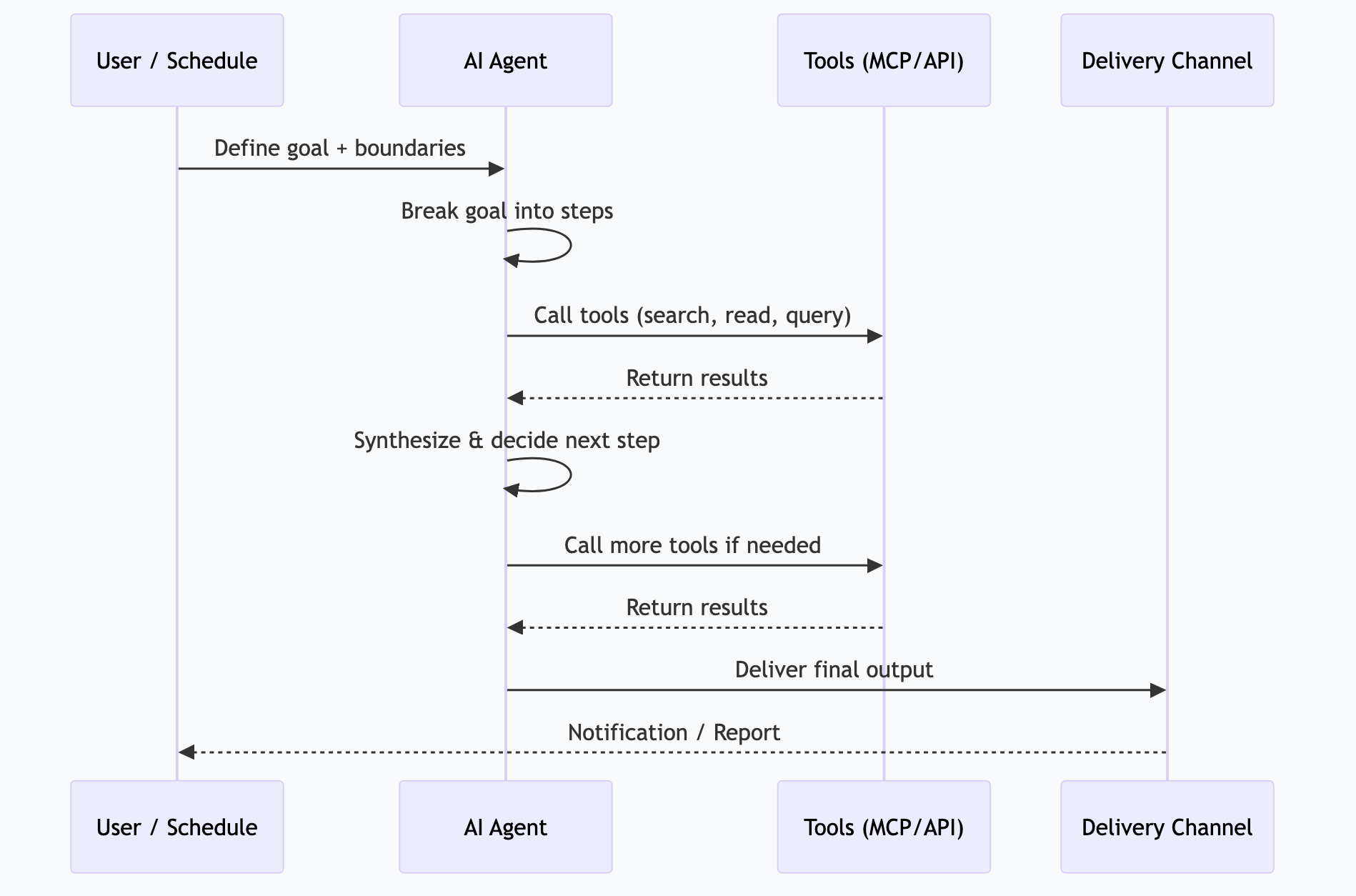
An AI agent is an AI system that works autonomously—it receives a goal, makes a plan, uses tools to execute that plan, and delivers results without you supervising each step. Unlike chatbots that wait for your next message, agents take initiative.
| Chatbot | AI Agent |
|---------|----------|
| Responds to one message at a time | Executes multi-step workflows |
| Waits for your next input | Works independently until done |
| Uses knowledge only | Uses knowledge AND tools |
| "Here's what I think" | "Here's what I did" |
| You drive the conversation | You define the goal, agent drives execution |
The Agent Spectrum
Not all automation is agent automation. Understanding the spectrum helps you pick the right level for each task.

Level 1: Simple Automation (Scripts)
Traditional automation. A script runs predefined steps in a fixed order. No AI involved.
If new_email → forward to team → doneStrengths: Predictable, fast, zero AI cost.
Limits: Can't handle exceptions, can't adapt, brittle.
Level 2: AI-Assisted (Chat + Tools)
You prompt an AI with MCP servers connected. The AI uses tools when you ask, but you direct every step.
You: "Check my calendar for tomorrow"
AI: [calls calendar tool] → "You have 3 meetings..."
You: "Draft prep notes for each"
AI: [drafts notes] → "Here are your prep notes..."
Strengths: Flexible, handles ambiguity, easy to start.
Limits: Requires your attention. Doesn't run without you.
Level 3: Autonomous Agent
The AI receives a goal and handles the entire workflow. It decides which tools to use, in what order, and handles errors along the way.
Goal: "Every morning at 6:30 AM, deliver a briefing with my calendar, important emails, overdue tasks, and relevant news."
Agent: [checks calendar] → [scans email] → [queries task manager] → [searches news] → [synthesizes briefing] → [delivers to Discord]
Strengths: Runs without you, handles variations, scales.
Limits: Needs well-defined boundaries. Can fail on truly novel situations.
Level 4: Multi-Agent Systems
Multiple agents coordinate. One agent researches, another writes, another edits, another publishes. They pass work between them.
SCOUT agent: [finds trending topics] → passes to
FORGE agent: [generates article outline] → passes to
QUILL agent: [writes draft] → passes to
LEDGER agent: [fact-checks and validates] → passes to
MAVEN agent: [optimizes for SEO and publishing]
Strengths: Specialized agents outperform generalists. Parallel execution.
Limits: Complex to build and debug. Coordination overhead.
Building Your First Agent
You don't need a framework or custom code to start. Here's the progression from simple to sophisticated.
Method 1: Scheduled Prompts (Easiest)
The simplest agent is a prompt that runs on a schedule. No framework needed.
Tools: Ollama + cron (or n8n, Make, Zapier)
# A cron job that runs at 6:30 AM
30 6 * * * curl -s http://localhost:11434/api/chat -d '{
  "model": "gemma4:26b",
  "messages": [{"role": "user", "content": "Generate a morning briefing..."}]
}' | jq -r '.message.content' | send-to-discord
This is technically an agent—it runs autonomously, uses a model, and delivers results. It just can't use tools or handle multi-step logic.
Method 2: AI Gateway (Recommended Starting Point)
An AI gateway like OpenClaw sits between your scheduled tasks and your models. It adds tool calling, model routing, and error handling.
What a gateway provides:
Schedule management (cron-like)
Model selection per task
MCP server connections (tools)
Output delivery (Discord, Slack, email)
Error handling and retries
Logging and monitoring
This is where most people should start for real agent automation. You get 80% of the power with 20% of the complexity.
Method 3: Agent Frameworks (For Developers)
If you want full control, frameworks like LangChain, CrewAI, or the Claude Agent SDK let you build custom agent logic in code.
# Conceptual example
agent = Agent(
    model="gemma4:26b",
    tools=[calendar, email, web_search, task_manager],
    goal="Generate a morning briefing"
)
result = agent.run()
Use frameworks when: You need custom logic, complex coordination between agents, or integration with specific systems that don't have MCP servers.
Designing Reliable Agent Workflows
Agents fail when their scope is unclear. Here's how to design workflows that actually work in production.
The Three Constraints
Every reliable agent workflow defines:
1. Goal—What does "done" look like? Be specific. "Research AI trends" is vague. "Find 5 news articles from the past week about MCP servers and summarize each in 2 sentences" is actionable.
2. Tools—What can the agent access? Only give it the tools it needs. An agent that can search the web, read email, and post to social media has a larger blast radius than one that can only search and summarize.
3. Boundaries—What should the agent NOT do? "Never send messages directly—always save as draft for review." "Never delete files." "If uncertain, log the uncertainty and skip."
Error Handling Patterns
| Pattern | How It Works | When to Use |
|---------|-------------|-------------|
| Retry with backoff | Try again after a delay | Transient failures (API timeouts, rate limits) |
| Fallback model | Switch to a different model | Model-specific failures |
| Human escalation | Alert a human and pause | High-stakes decisions, ambiguous situations |
| Skip and log | Log the failure, continue with remaining tasks | Non-critical subtasks in a batch |
| Circuit breaker | Stop after N consecutive failures | Prevent cascading failures |
The Review Step
For any agent workflow that produces output seen by others, add a review step:
Draft mode: Agent creates drafts, human approves before sending
Threshold mode: Agent acts autonomously below a confidence threshold, escalates above it
Audit log: Agent acts freely but logs everything for post-hoc review
Start with draft mode. Move to threshold mode once you trust the workflow. Keep audit logs always.
How I Actually Do This
I run 26 automated agent tasks on a Mac Studio through OpenClaw. Here's the architecture:
The Task Schedule
| Time | Agent Task | Model | Output |
|------|-----------|-------|--------|
| 6:00 AM | Research pipeline | Gemma 4 26B | Research summaries → knowledge base |
| 6:15 AM | System log review | Gemma 4 26B | Anomaly alerts → Discord |
| 6:30 AM | Morning briefing | Gemma 4 26B | Daily brief → Discord |
| 7:00 AM | Content research | Gemma 4 26B | Topic ideas → content queue |
| Every 5 min | Critical notification check | Gemma 4 e4B | Urgent alerts → Discord |
| Every hour | Important notification batch | Gemma 4 e4B | Batched notifications → Discord |
| Every 3 hours | Low-priority batch | Gemma 4 e4B | Digests → Discord |
| 8:00 PM | Evening summary | Gemma 4 26B | Day recap → Discord |
| 8:30 PM | Knowledge base builder | Gemma 4 26B | KB articles → local knowledge base |
| Saturday 8 AM | Deep system scan | Gemma 4 31B | Security + config audit → Discord |
| Sunday 9 AM | Weekly pipeline report | Gemma 4 26B | Metrics + status → Discord |
Routing Architecture
Every incoming task hits a router first:
Task arrives → Triage model classifies complexity →
  Simple → Gemma 4 e4B (fast, cheap)
  Standard → Gemma 4 26B (quality)
  Code → Qwen 3 Coder (specialized)
  Complex → Gemma 4 31B (deep reasoning)
The triage classification takes under 100ms. The right model gets the right task.
What I've Learned Running Agents Daily
1. Scope tight, iterate wide. Start each agent with a narrow, well-defined task. Expand scope only after it's been reliable for weeks.
2. Logs are everything. When an agent produces bad output, you need to know what prompt it received, what tools it called, and what each tool returned. Without logs, debugging is guesswork.
3. Models narrate instead of acting. Some models—particularly smaller ones—will describe what they would do rather than actually calling tools. This was the single most frustrating failure mode. Solution: test every model with actual tool-calling prompts before deploying it.
4. Schedule slack matters. If your 6:00 AM research pipeline occasionally takes 20 minutes, don't schedule the next task at 6:05 AM. Build buffer between dependent tasks.
5. $0/month is real. All 26 tasks run on local models through Ollama. The total cloud API cost is zero. Hardware paid for itself within two months of not paying for API calls.
Frequently Asked Questions
Can AI agents make mistakes?
Yes. Agents can misinterpret goals, use tools incorrectly, or produce low-quality output. The mitigation is constraint design—narrow scope, clear boundaries, human review for high-stakes outputs. Well-constrained agents on well-defined tasks are remarkably reliable.
How much does it cost to run AI agents?
If you run local models: hardware cost only ($0/month in API fees). A Mac Mini with 32 GB runs several agent tasks. A Mac Studio with 64+ GB runs dozens. Cloud-based agents using API calls typically cost $0.01-0.10 per task execution, depending on model and complexity.
What's the difference between AI agents and RPA (Robotic Process Automation)?
RPA automates UI clicks—it literally moves the mouse and types. AI agents understand context, make decisions, and use APIs directly. RPA is brittle (breaks when a UI changes). AI agents are flexible (adapt to variations in input). They solve different problems, though AI agents are increasingly replacing RPA for knowledge work.
Can agents work with my existing tools?
Yes, through MCP servers. If your tool has an MCP server (or an API), agents can use it. Calendar, email, databases, file systems, web search, Slack, GitHub—all connectable. The MCP ecosystem covers most common business tools.
How do I monitor agents in production?
Log every execution: timestamp, prompt, tool calls, responses, and final output. Set up alerts for failures, timeouts, and anomalous output. Review logs weekly to catch quality drift. This is the same principle as monitoring any automated system—visibility is everything.
*This is part of the ASTGL Definitive Answers series—structured, practical answers to the questions people actually ask about AI automation, MCP servers, and local AI infrastructure.*