


Not every task needs the biggest model. A 4-billion parameter model can sort your notifications just as well as a 70-billion parameter one—and it'll do it 10x faster.
The trick isn't finding one "best" model. It's matching the right model to each job. Here's how to think about it, with specific recommendations for every common use case.
The Short Answer
There is no single best local LLM. The best model depends on your task, your hardware, and your tolerance for slower responses. Here's the quick decision matrix:
| Task | Best Model | Minimum Memory | Why |
|------|-----------|---------------|-----|
| General daily use | Gemma 4 26B | 32 GB | Best quality-per-GB for mixed workloads |
| Coding | Qwen 3 Coder 32B | 48 GB | Strongest code generation and tool calling |
| Quick triage/routing | Gemma 4 e4B | 8 GB | Fast, cheap, good enough for classification |
| Long documents | Gemma 4 26B (16K ctx) | 48 GB | Strong comprehension with extended context |
| Creative writing | Gemma 4 31B | 48 GB | Better voice and nuance at larger sizes |
| Research/analysis | Llama 3.3 70B | 96 GB | Maximum reasoning depth |
| Structured output | Qwen 3 8B | 16 GB | Reliable JSON/tool calling at small size |
Understanding Model Tiers
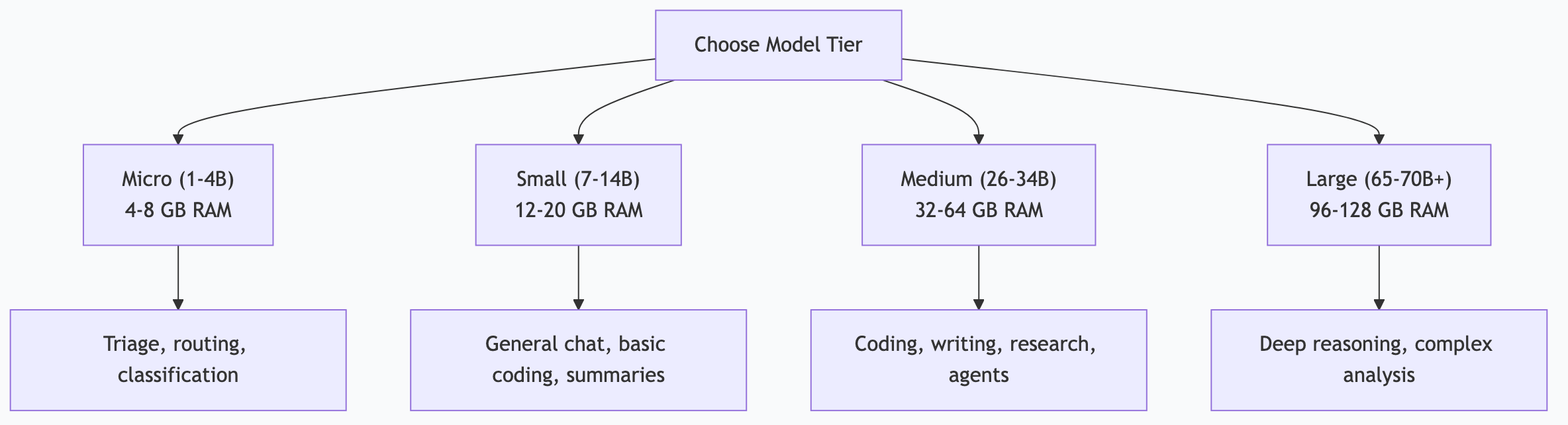
Local LLMs come in rough capability tiers. Knowing where each tier sits helps you avoid overspending memory on simple tasks—or underpowering complex ones.
Tier 1: Micro (1-4B parameters)
Models: Gemma 4 e4B, Phi-3 Mini, Qwen 3 1.7B
Good for: Classification, routing, keyword extraction, simple formatting, notification triage, yes/no decisions.
Not good for: Complex reasoning, nuanced writing, multi-step analysis, coding beyond snippets.
Memory: 4-8 GB
These models are fast and cheap. Use them for high-volume, low-complexity tasks where speed matters more than depth. If you're processing hundreds of notifications per day, a micro model handles the sorting while your bigger models handle the interesting work.
Tier 2: Small (7-14B parameters)
Models: Gemma 3 12B, Qwen 3 8B, Llama 3.2 11B
Good for: General conversation, basic coding, summarization, email drafting, structured output, moderate reasoning.
Not good for: Complex multi-step reasoning, long document analysis, production-grade code generation.
Memory: 12-20 GB
The sweet spot for most people starting out. A Gemma 3 12B on a 16 GB MacBook handles daily tasks surprisingly well. These models punch above their weight on focused tasks.
Tier 3: Medium (26-34B parameters)
Models: Gemma 4 26B, Gemma 4 31B, Qwen 3 Coder 32B, Qwen 3 32B
Good for: Almost everything—coding, writing, research, complex analysis, tool calling, agent tasks.
Not good for: Tasks requiring frontier-model reasoning (use cloud Claude for those).
Memory: 32-64 GB
This is where local models become genuinely competitive with cloud APIs for most tasks. Gemma 4 26B is my daily workhorse—it handles 80% of everything I throw at it.
Tier 4: Large (65-70B+ parameters)
Models: Llama 3.3 70B, Qwen 3 72B, DeepSeek V3
Good for: Maximum local quality, deep reasoning, complex research, academic analysis.
Not good for: Anything where speed matters—these are slow without enterprise hardware.
Memory: 96-128+ GB
Impressive quality, but the hardware requirements limit accessibility. If you have a Mac Studio with 192+ GB or a multi-GPU server, these are worth exploring. Otherwise, use cloud models for tasks that need this level.
Task-Specific Recommendations
Coding
Best: Qwen 3 Coder 32B
Runner-up: Gemma 4 26B
Budget: Qwen 3 8B
Coding requires strong structured output, function understanding, and the ability to follow precise instructions. Qwen 3 Coder is purpose-built for this. It handles:
Code generation across languages
Tool calling and function signatures
Debugging and refactoring
Test generation
Structured JSON output
Important finding: Some models narrate what they would do instead of actually executing tool calls. Qwen 3 8B sometimes exhibits this behavior—it describes the function call rather than producing the structured output. Qwen 3 32B (and the Coder variant) follows tool-call instructions reliably. Test your chosen model with actual tool-calling prompts before committing to it for automation.
Writing and Content
Best: Gemma 4 31B
Runner-up: Gemma 4 26B
Budget: Gemma 3 12B
Writing quality improves noticeably with model size. Larger models produce more natural voice, better paragraph flow, and more nuanced tone. For blog posts, documentation, and professional writing, the jump from 12B to 26B is significant.
For content pipelines where you're generating dozens of pieces, 26B offers the best throughput-to-quality ratio. Save 31B for final drafts or pieces where voice really matters.
Research and Analysis
Best: Llama 3.3 70B
Runner-up: Gemma 4 26B
Budget: Gemma 3 12B
Deep research tasks benefit from maximum reasoning capability. A 70B model catches connections and nuances that smaller models miss. But for daily research briefs and competitive monitoring, 26B is more than sufficient.
Automation and Agent Tasks
Best: Gemma 4 26B (general) + Qwen 3 8B (structured output)
Budget: Gemma 4 e4B (triage) + Gemma 3 12B (execution)
Agent automation needs reliable tool calling, consistent structured output, and the ability to follow multi-step instructions. You don't always need the smartest model — you need the most reliable one.
For triage tasks (sorting, routing, classification), micro models are perfectly reliable and run 10x faster. Route the complex work to bigger models.
The Multi-Model Architecture
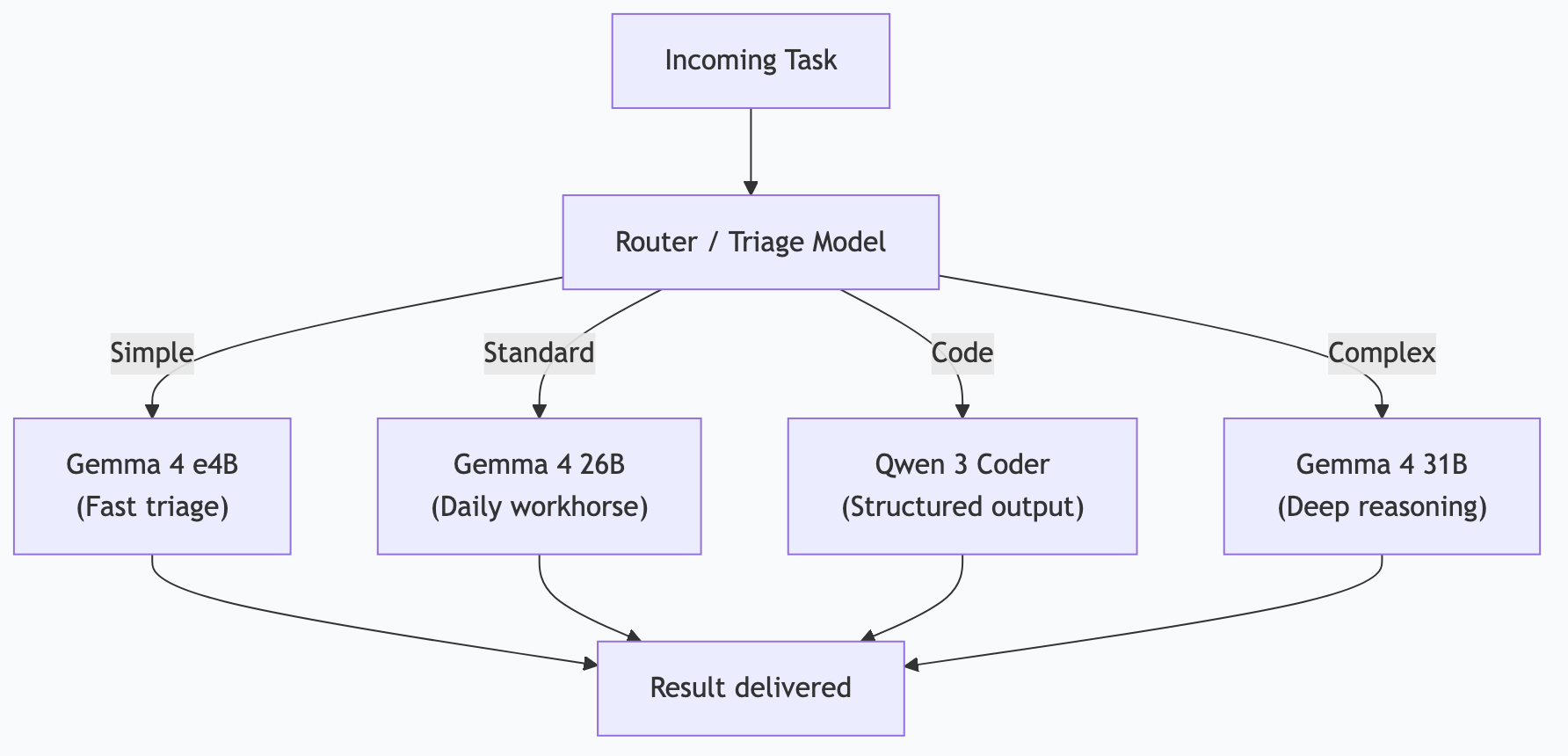
Running a single model for everything is like using a sledgehammer for every nail. The smart approach is a tiered architecture where each model handles the tasks it's best at.
My 4-Tier Setup
| Tier | Model | Tasks | Daily Volume |
|------|-------|-------|-------------|
| Triage | Gemma 4 e4B | Notification sorting, priority classification, routing decisions | ~500 calls |
| Daily | Gemma 4 26B | Research, drafting, analysis, briefings, content generation | ~100 calls |
| Code | Qwen 3 Coder (fast) | Code generation, tool calling, structured output, MCP interactions | ~50 calls |
| Heavy | Gemma 4 31B | Complex reasoning, long documents, multi-step analysis | ~10 calls |
A routing layer (itself running on the triage model) examines each incoming task and sends it to the appropriate tier. Simple tasks go fast. Complex tasks get the power they need.
Why Not Just Use the Biggest Model?
Three reasons:
1. Speed. A 4B model responds in milliseconds. A 31B model takes seconds. For 500 daily triage operations, that's the difference between instant and painfully slow.
2. Concurrency. Smaller models use less memory, so you can run more models simultaneously. Four small models serving different task types beats one large model handling a queue.
3. Cost-efficiency. Even though local models are "free," memory is finite. Using a 31B model for notification sorting wastes 17 GB of memory that could serve other workloads.
How I Actually Do This
My Mac Studio M3 Ultra with 256 GB unified memory runs all four tiers simultaneously through Ollama:
# All models pinned permanently — no cold starts
export OLLAMA_KEEP_ALIVE=-1
export OLLAMA_MAX_LOADED_MODELS=4
OpenClaw (my local AI gateway) routes tasks to the appropriate model based on a classification prompt:
Given this task: [task description]
Which tier should handle it?
- TRIAGE: Simple classification, yes/no, sorting
- DAILY: Research, drafting, analysis, summarization
- CODE: Code generation, tool calling, structured output
- HEAVY: Complex reasoning, long documents, multi-step logic
Reply with only the tier name.
The triage model runs this classification in under 100ms. The task then goes to the right model. This architecture has been running 26 automated tasks daily for months with zero model-related failures.
When I Still Use Cloud Claude
Local models have a ceiling. For tasks that need frontier reasoning—complex architectural decisions, nuanced code review across large codebases, novel problem-solving—I reach for cloud Claude. It's not about local vs. cloud. It's about using the right tool.
My split: ~90% local, ~10% cloud. The 10% is high-value work where the quality difference justifies the cost.
Picking Your Starting Model
Don't overthink it. Here's the decision tree:
1. How much memory do you have?
8-16 GB → Start with Gemma 3 12B
32-64 GB → Start with Gemma 4 26B
96+ GB → Start with Gemma 4 26B + Qwen 3 Coder 32B
2. What's your primary use?
General → Gemma 4 26B
Coding → Qwen 3 Coder 32B
Writing → Gemma 4 26B (or 31B if you have memory)
3. Run it for a week. If quality falls short on specific tasks, add a specialist model for those tasks. If it handles everything, you're done.
Frequently Asked Questions
How often do new models come out?
Major model releases happen every few months. Ollama makes upgrading easy — `ollama pull model:latest` downloads the new version. You don't need to chase every release. Upgrade when a new model offers clear improvements for your specific tasks.
Should I use quantized models?
Quantization shrinks models by reducing numerical precision. A Q4 quantized 70B model fits in roughly the same memory as a full-precision 26B model. The quality trade-off is usually small—Q4 and Q5 quantizations preserve most capability. For memory-constrained systems, quantized larger models often outperform full-precision smaller ones.
Can I fine-tune local models?
Yes, but you probably shouldn't—at least not yet. Fine-tuning requires significant expertise and compute. For most use cases, prompt engineering and Modelfiles (custom system prompts) get you 90% of the way there. Save fine-tuning for when you've exhausted prompt-based approaches.
Do model benchmarks matter?
Benchmarks measure synthetic tasks that may not reflect your workload. A model that scores highest on HumanEval might not be the best at drafting your emails. Use benchmarks as rough filters, then test with your actual tasks. Five real-world test runs tell you more than any leaderboard.
What about multimodal models (vision, audio)?
Ollama supports multimodal models like LLaVA and Gemma 4 with vision. These can analyze images, screenshots, and documents. Useful for automation tasks like reading invoices, analyzing charts, or processing visual data. The vision capabilities are still maturing but improving rapidly.
*This is part of the ASTGL Definitive Answers series—structured, practical answers to the questions people actually ask about AI automation, MCP servers, and local AI infrastructure.*