


Apple's container CLI hit 1.0 this month, picked up 30,000 GitHub stars, and arrived with the usual promise: faster than Docker on Apple Silicon, lighter, and more native. It runs Linux containers in lightweight VMs, written in Swift, optimized for your M-series chip.
I wanted to know if the promise holds. So I didn't read the marketing. I benchmarked it.

And I added a third contender Apple didn't mention: OrbStack. Because if you've already gotten tired of Docker Desktop on a Mac, OrbStack is probably what you switched to. Leaving it out of a "fast containers on Apple Silicon" comparison would've been lacking since it's the one a lot of us actually run.
Here's what the numbers say and how to decide which one belongs on your machine.
How I tested this
Quick note on method: because a benchmark you can't trust is just a screenshot of one lucky run.
Everything ran on a Mac Studio: M3 Ultra, 256 GB RAM, macOS 26.5.1. All three tools pulled the same images, pinned by digest, so nobody got a different build. Every measurement is the median of at least 10 runs, warmup discarded, each run in a clean subprocess so state from one couldn't bleed into the next.

Nine scenarios: container startup, a web server coming up, Postgres accepting connections, CPU work, disk I/O on a bind mount, container-to-container networking, an image build, a multi-service stack, and a density ramp. Plus idle footprint.
The whole harness is public if you want to reproduce it or pick it apart: github.com/Jmeg8r/apple-container-vs-docker. Every claim below traces to a number in that repo or a failure I logged on purpose.
One thing that matters before we start: all of this is on macOS 26 (Tahoe). On macOS 15, Apple container can't even do container-to-container networking. Containers get IPs but can't talk to each other. If you're not on Tahoe yet, half of this comparison doesn't apply to you, and the answer is "stay on Docker or OrbStack." For everyone else, read on.
The one number where Apple wins outright
Let's lead with Apple's real victory, because it's a good one.
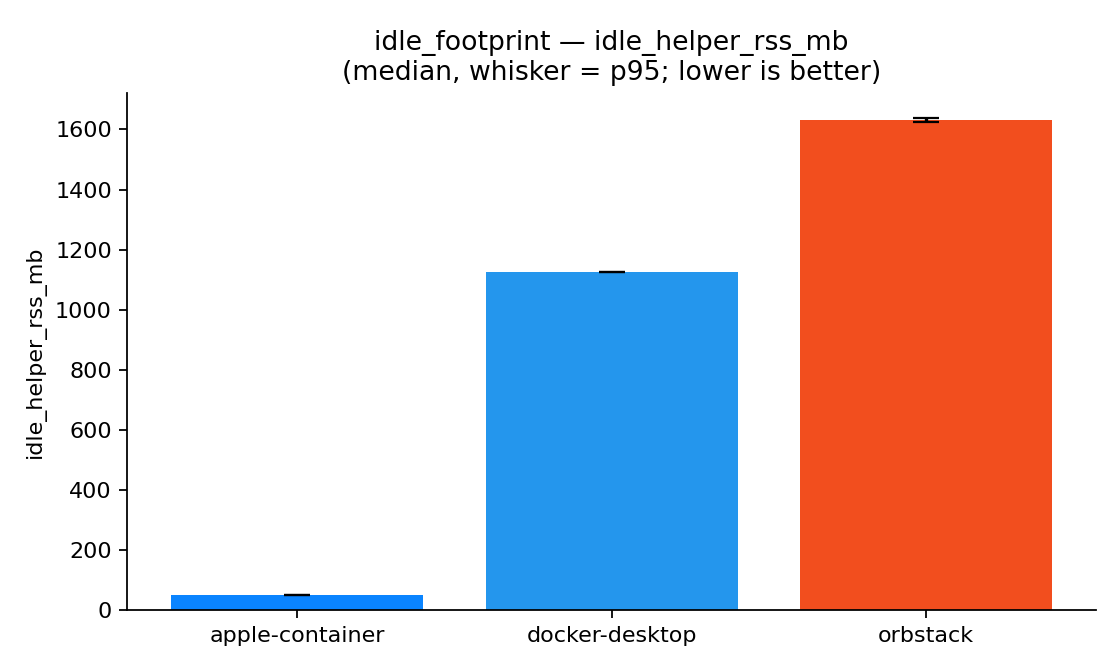
Idle footprint. With nothing running—no containers, just the runtime sitting there ready. Apple container holds about 51 MB of memory. Docker Desktop sits at 1,124 MB. OrbStack at 1,631 MB.
That's not a typo. Apple container uses 22 to 32 times less memory at rest than the other two.
The reason is architectural. Docker Desktop and OrbStack each run one big Linux VM that stays resident the whole time you're logged in, whether you're using it or not. Apple container doesn't keep a VM warm. It spins one up per container and tears it down when the container stops. Nothing running means nothing resident.
If you keep a couple of long-lived services on your laptop and want them out of the way the rest of the day, this is a genuinely meaningful win. Your RAM is yours again when you're not using containers.
Hold onto that "spins up a VM per container" detail, though. It's also the source of every place Apple loses.
Where it ties and quietly wins again
Before the losses, give Apple its due on two more.
Raw CPU is a dead heat. Running sysbench inside a container, Apple container actually came out slightly ahead, about 38,500 events per second versus 36,400 for Docker Desktop and 33,500 for OrbStack. The per-VM model adds no real tax on compute. Once your code is running, it runs at full speed.
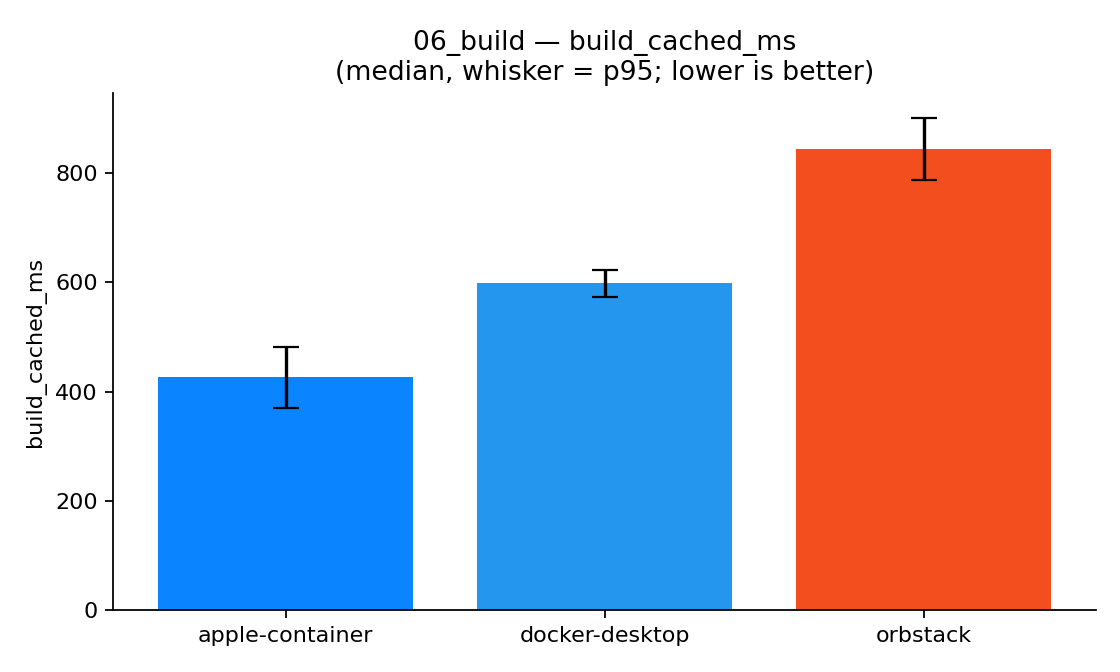
Cached builds are Apple's fastest. Rebuild an image when the layers are already cached, and Apple finishes in about 426 ms. Quicker than Docker Desktop (598 ms) and noticeably quicker than OrbStack (844 ms).
So this isn't a story about a slow tool. Where the VM boundary isn't sitting in the hot path, Apple container is right there with the best of them and sometimes ahead.
The per-VM tax: everywhere it creates or moves data
Now the other side. And it's consistent enough that you can predict it: anything that involves spinning up a container or pushing data across the VM boundary costs Apple time.
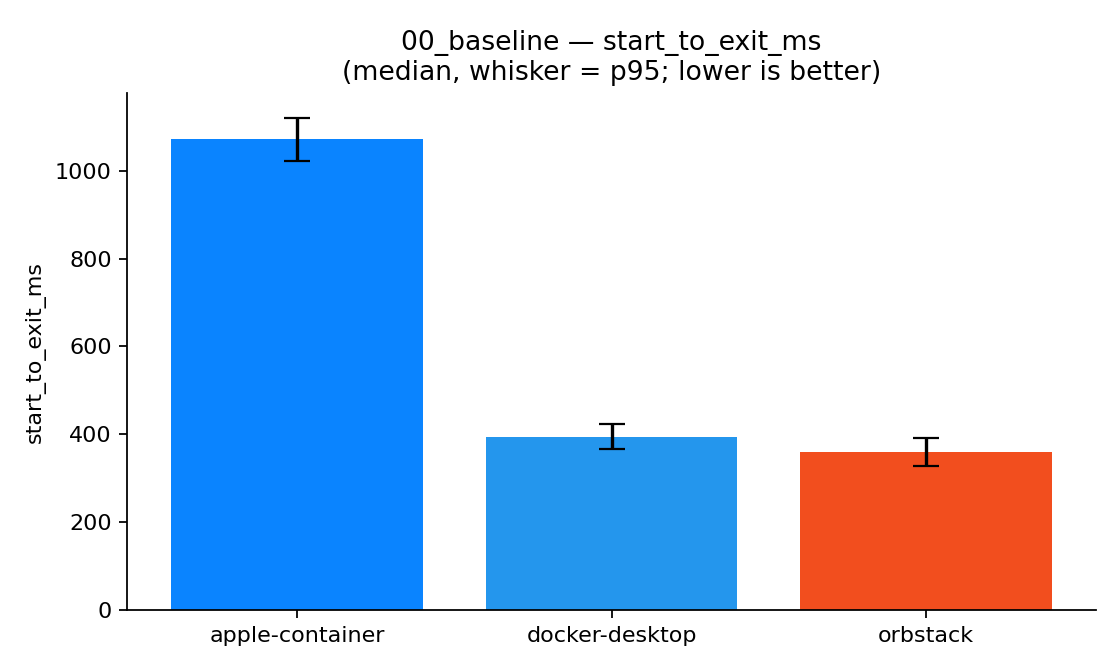
Startup. A bare container's start-to-exit takes Apple about 1,071 ms versus ~360–395 ms for the others.
Nginx answering its first request: 1,095 ms versus ~290 ms. Postgres accepting a connection: 2,081 ms versus 292 ms on Docker Desktop. That's 3× to 7× slower, depending on the workload. Every time you start something, you're paying for a VM to boot.
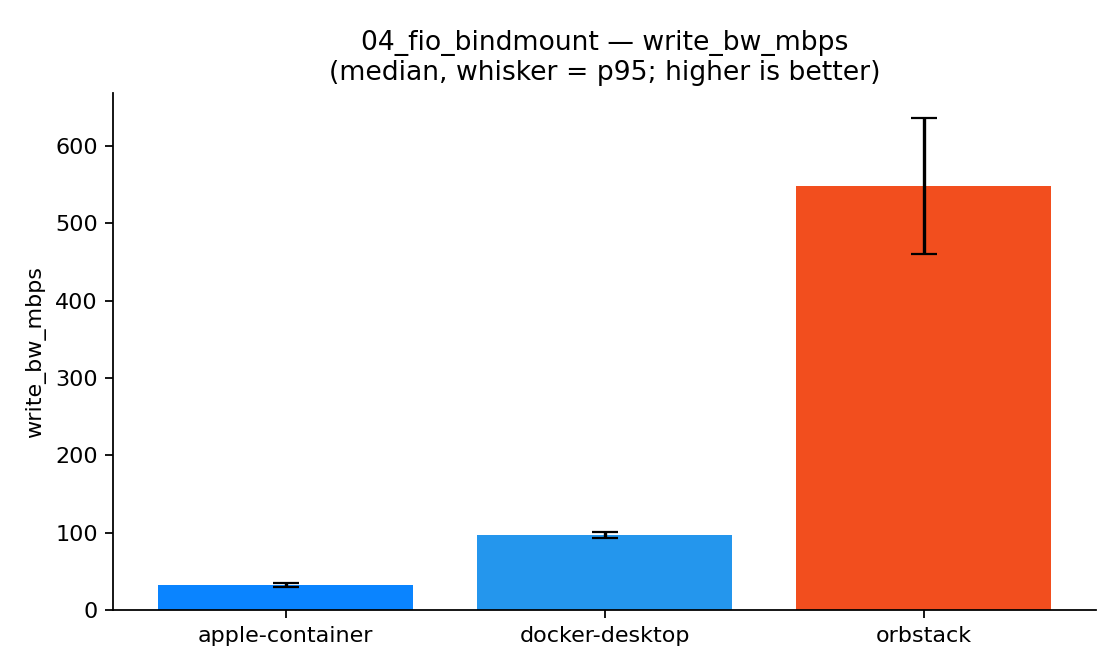
Bind-mount disk I/O—this is the one that'll bite you. Mount a folder from your Mac into the container and write to it, and Apple manages about 32.6 MB/s. Docker Desktop does 96.7. OrbStack does 548.5 MB/s which is roughly 17 times faster than Apple.
Sit with that one, because it's not an abstract benchmark. Mounting your source tree into a container and editing it live. The hot-reload dev loop, the thing a huge number of Mac developers do all day, runs straight through this path. On Apple container, that loop is going to feel like wading through mud.
Networking between containers follows the same shape: ~11 Gbps for Apple, ~53 for Docker Desktop, and ~85 for OrbStack. Real network hops between separate VMs versus traffic staying inside one shared VM.
And density. Spinning up 40 containers took Apple about 35 seconds. Docker Desktop and OrbStack did it in roughly 9. Forty VMs versus forty processes in one VM—the model shows up again. (To be fair, none of the three actually fell over at 40; I capped it there to be kind to my machine. Finding Apple's true ceiling is a job for another day.)
None of this is a bug. It's the direct, honest consequence of one lightweight VM per container. You're trading creation speed and I/O for isolation and a clean idle state. Whether that's a good trade depends entirely on what you do all day.
The gaps that have nothing to do with speed
Numbers aside, a few things will just stop you cold, and these matter more for daily use than any millisecond.
No Docker Compose. This is the big one. If your project starts with docker compose up, Apple container has no native answer. You're back to creating a network and running each service by hand, or leaning on an unofficial third-party bridge. Docker Desktop and OrbStack both speak Compose fluently.
Image names have to be fully qualified. container run alpine fails. You need container run docker.io/library/alpine. Small thing, but it'll trip every script and muscle-memory habit you have.
Port publishing isn't the model you know. I expected -p 8080:80 to put the service on localhost:8080 like Docker does. On Apple container it didn’t—the container was serving fine, but on its own IP address, not on localhost. Apple's model is "every container gets a real routable IP," which is elegant, but it's not the muscle memory you've built. (Related gotcha: poll 127.0.0.1, not localhost — localhost can resolve to IPv6 first and miss the service entirely.)
DevContainers support is incomplete. If you live in VS Code's dev containers, you're not there yet.
If you want to try it yourself
It's a five-minute install. The one non-obvious step is the kernel.
# Apple container
brew install container
container system kernel set --recommended   # do this first, or `start` prompts you
container system start

# OrbStack, if you want to compare
brew install --cask orbstack
Then remember the gotchas above: fully-qualified image names, reach services by their container IP, and 127.0.0.1 over localhost. That's most of the friction right there.
So which one do you actually use?
Here's how I'd decide.
Reach for Apple `container` when you run a handful of long-lived containers and you care about isolation and a clean idle footprint—a couple of always-on services on a laptop you also use for everything else. The per-container VM boundary is real security isolation, and getting your RAM back when you're idle is a nice perk. Just don't point your live-editing dev loop at it.

Reach for OrbStack if you want fast Docker without the friction. It won every speed test that involved I/O or networking, starts containers as fast as anything, and crucially, it still speaks Compose and the full docker CLI. The only price is the biggest idle footprint of the three and the slowest cached build. For most Mac developers, this is the easy pick.
Stay on Docker Desktop when you need the whole ecosystem—Compose, DevContainers, and the broadest tooling and documentation. It sat in the middle of nearly every benchmark, and "middle of the pack with everything supported" is exactly what a default should be.
The headline I came in expecting — "Apple container is faster than Docker" — just isn't what the data shows. It's faster at a few specific things and slower at most of the rest. But that's not a knock. It's a specialist. It does one shape of work really well and asks you to give up the conveniences you've built your workflow around.
Know which shape of work you're doing, and the choice makes itself.
The full harness, raw numbers, and every chart are public: github.com/Jmeg8r/apple-container-vs-docker Run it on your own machine. I'd genuinely like to see whether the bind-mount gap holds on an M1 or M2, or whether 256 GB of headroom is flattering somebody.