


"Isn't that expensive?" Every time I talk about using Claude Code for a project, someone asks this. The honest answer is: it depends entirely on what you route to Claude versus what you run locally. On a Mac Studio with unified memory, the economics change fast. Here's the routing table I actually use.
The Setup
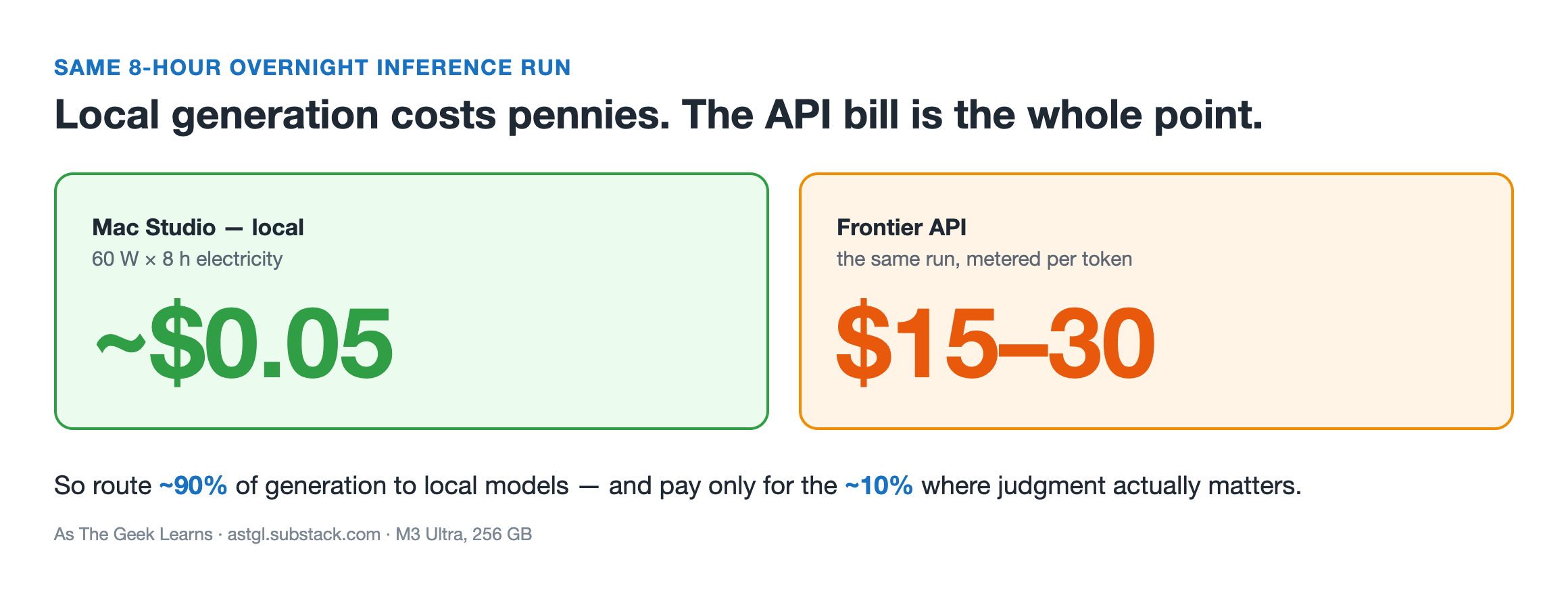
I have an M3 Ultra with 256 GB unified memory. That machine runs a 70B model locally with room to spare and a 235B mixture-of-experts model when I need frontier-scale reasoning. Running it at load draws around 60 watts. Eight hours of overnight inference work costs about five cents in electricity at typical US rates. The same run on a Frontier API would cost somewhere between fifteen and thirty dollars.

But cost isn't the primary reason to run locally. Latency is. My workhorse model, gemma4:31b-mlx, stays pinned in GPU memory, so there's no cold-start delay. It begins responding the moment you hit enter on M-series hardware. That's interactive. You can iterate on code at conversational speed with a local model, then bring Claude in for the decisions that actually require judgment.
Most developers running Claude Code for everything are paying for two things: generation (which local models handle well) and judgment (which frontier models handle better). Splitting those tasks cuts the API spend dramatically while keeping the quality where it matters.
What's Actually Going On
The routing principle has one line: "Claude reads the playbook. Local models do the work."

Local models handle generation: the fast, cheap, iterative part. New code, first-draft text, refactoring suggestions, variant generation. Claude Code handles orchestration and the Compound step: planning, judging what goes in learnings.jsonl, reviewing the session output, and updating CLAUDE.md.
The model routing table I use:
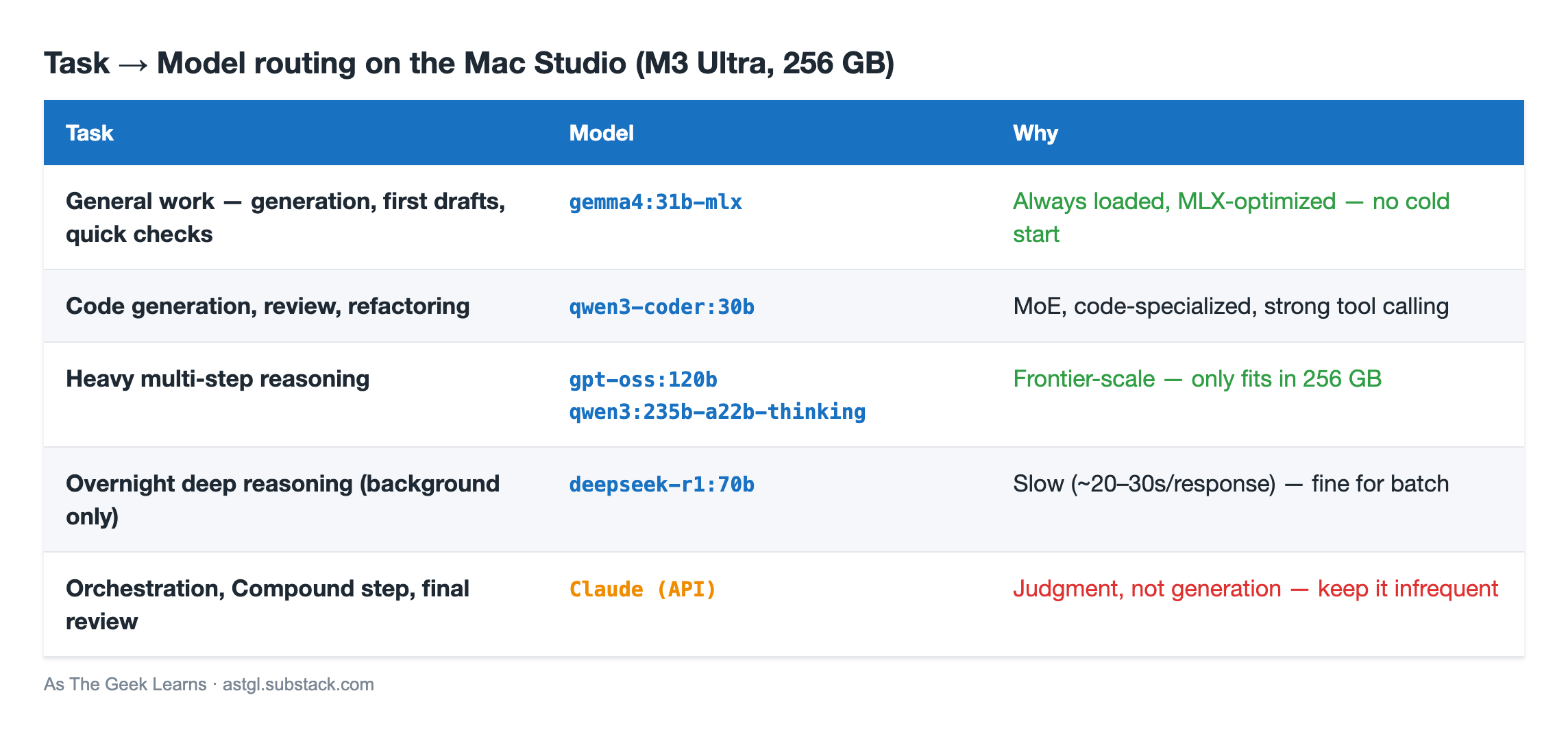
The everyday models are light. gemma4:31b-mlx loads in about 20 GB on disk and sits pinned in GPU memory (around 46 GB resident at its full 256K context). qwen3-coder:30b, a mixture-of-experts model that activates only ~3B parameters per token, loads in another 18 GB. On an M3 Ultra with 256 GB, both stay resident at once with enormous headroom enough to also pull a 120B or even a 235B reasoning model on demand. That last one is the whole point of the memory: a 235B model at Q4 needs around 142 GB and simply won't load on a smaller machine.
deepseek-r1:70b needs 64 GB or more. It's not interactive, responding in 20-30 seconds per generation. That's fine for overnight batch jobs. It's not fine for a code review you're waiting on.
The Fix
Setting up Ollama on a Mac Studio takes about 10 minutes:
brew install ollama
ollama pull gemma4:31b-mlx     # primary workhorse (MLX build, Apple-Silicon optimized)
ollama pull qwen3-coder:30b    # code generation + review (MoE, strong tool calling)
# Heavy reasoning — only comfortable with lots of unified memory:
# ollama pull deepseek-r1:70b                          # ~42 GB, overnight reasoning
# ollama pull gpt-oss:120b                             # ~65 GB
# ollama pull qwen3:235b-a22b-thinking-2507-q4_K_M     # ~142 GB, needs 256 GB
Open the Ollama menu bar app once to enable auto-start on login. It runs as a local HTTP server at localhost:11434.
The session structure for a typical day:
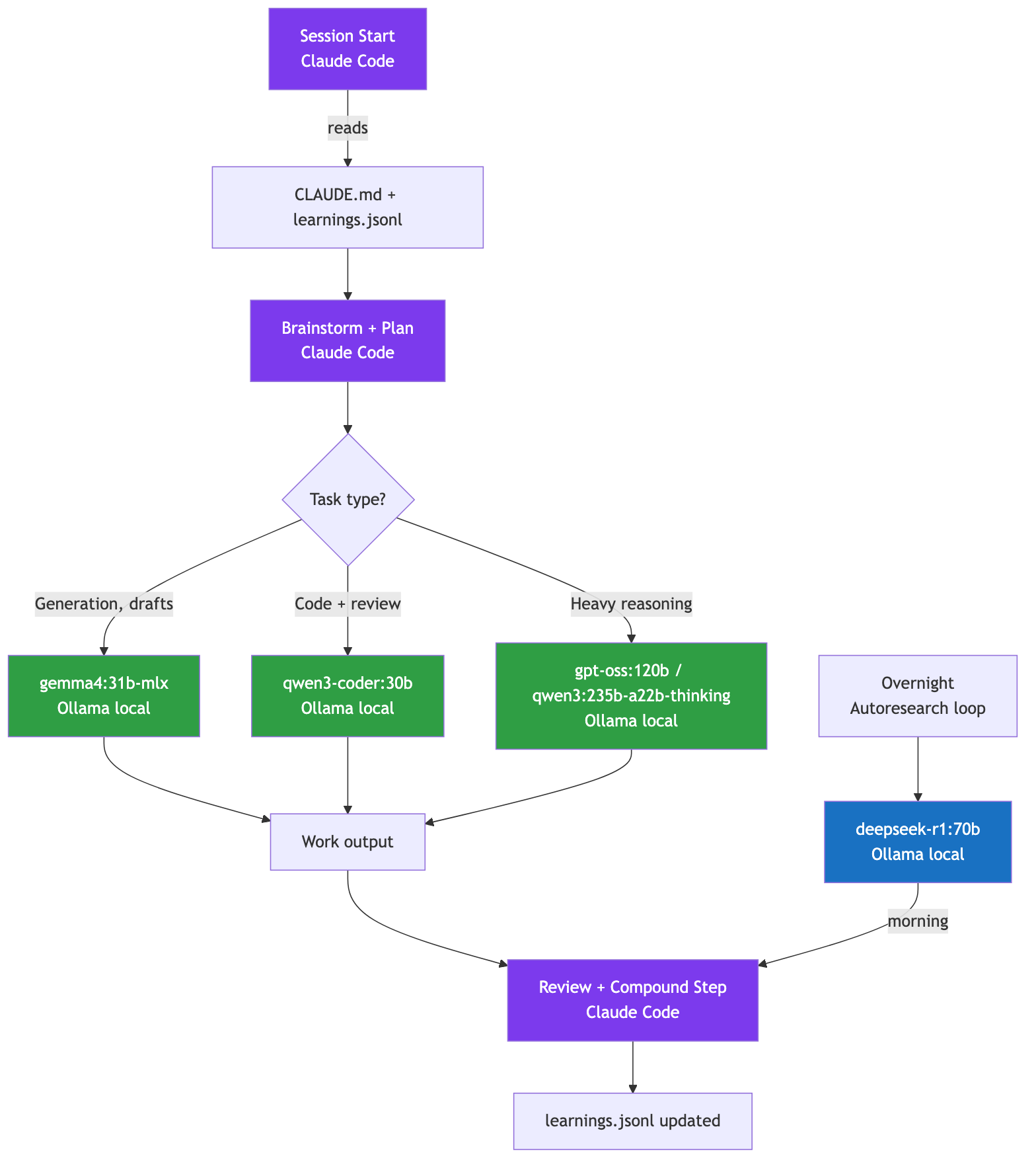
Morning: Planning (Claude Code)
  - Read CLAUDE.md + learnings.jsonl
  - Brainstorm, write plan with verify steps

Work (local models via Ollama)
  - gemma4:31b-mlx for generation and first drafts
  - qwen3-coder:30b for code and "catch what I missed"

Evening: Compound Step (Claude Code)
  - Review session, propose learnings
  - Update CLAUDE.md Known Patterns table
  - Check tests, commit

Overnight (optional, if you have enough RAM for a 70B model):
  - deepseek-r1:70b running autoresearch loop
    on a skill file or prompt variant
The Compound step is where the two frameworks connect. Karpathy's Autoresearch pattern (one file, one metric, keep/revert with git) maps directly onto a local overnight job. Instead of optimizing a training script, you optimize a skill file or a prompt file from your .claude/commands/ directory.
Define a set of test cases: files with known issues your skill should catch. Run variants overnight. Keep the variants that find more issues; revert the rest. In the morning, run the Compound step with Claude on the winning variants.
The autoresearch loop becomes the Work step in a Compound Engineering session.
Why This Matters
I've had a real-world data point on this from the stoicism-agent project, where I ran the first overnight autoresearch loop using local models. The learning I wrote after that run:
"The fork between MLX and Ollama for autoresearch comes down to one question: do you need to modify model weights? MLX if yes. Ollama for prompt-level optimization. For skill file autoresearch, Ollama is the right choice."
That's the kind of learning you only get by running the thing. The instinct before running it was to reach for MLX because it's the "native" Mac AI framework. The result after running it: Ollama is simpler, has better model selection, and is more than fast enough for overnight prompt optimization where you're not touching weights.

Same principle scales to any overnight optimization loop. Pick the tool that matches the task. Don't reach for fine-tuning when prompt-level optimization will do.
The cost math on the Mac Studio, after a few months of this workflow: roughly 90% of generation work routes to local models. The 10% that goes to Claude is the judgment layer: planning, compound steps, final review. Total Claude API spend for a typical weekend session runs $2-3. For a full week of this, maybe $8-10.

The Mac Studio has nearly paid for itself in API savings after about 7 months. More importantly, the learnings file from six months of consistent Compound Engineering is now the most valuable artifact in my projects. Not the code. The 200+ preserved decisions.
Code can be rewritten. Those decisions can't.
Quick Reference
Install:
brew install ollama, open Ollama.app for auto-startPrimary workhorse:
gemma4:31b-mlx(~20 GB, pinned in GPU, MLX-optimized)Code generation + review:
qwen3-coder:30b(~18 GB, MoE)Heavy reasoning:
gpt-oss:120b(~65 GB) orqwen3:235b-a22b-thinking(~142 GB, needs 256 GB)Overnight reasoning:
deepseek-r1:70b(needs 64 GB+, ~20-30s/response)Never route to local: Compound step, final review, architectural decisions
Autoresearch overnight: use
deepseek-r1:70bfor skill/prompt optimization, not weight trainingAlso resident:
nomic-embed-textfor embeddings, a custom voice model for narrationSmaller machines: a 76 GB M2 Ultra runs
gemma4:31b-mlx+qwen3-coder:30bfine, but the 120B–235B tier needs the 256 GBFull routing table:
docs/local-llm-routing.mdin the template repo

Found this useful? I share practical lessons from my systems engineering journey at As The Geek Learns (https://astgl.substack.com)