


I shipped an MCP knowledge server in a weekend with sqlite-vec and Ollama. It answers questions about my own articles. It runs on a laptop. It costs $0/month.
Then someone asked the obvious next question: "Can you point it at our Confluence? And Notion? And the Google Drive?"
Suddenly self-hosted isn't free anymore. It's a part-time job—PDF parsing, OCR, re-indexing schedules, dealing with 50-page slide decks where the first 20 pages are a title card. The embedding pipeline that was elegant for 20 markdown articles starts to sweat when you throw a 400-page SOC 2 audit at it.
So here's the question I had to actually answer for myself: when does paying Cloudflare, AWS, or Pinecone actually beat running your own stack?
I spent a research pass comparing the live services. Here's what I found.
TL;DR
Self-host when content is static, under about a thousand docs, single source, you control ingestion cadence, and privacy or cost-per-query matters more than your time.
Hosted when: multiple unstructured sources, frequent re-indexing, non-engineers uploading docs, you need SLAs, or you're shipping this to customers.
Hybrid is increasingly common: hosted RAG for the customer-facing product, self-hosted for internal dogfooding and dev. The two aren't mutually exclusive.
The Contenders
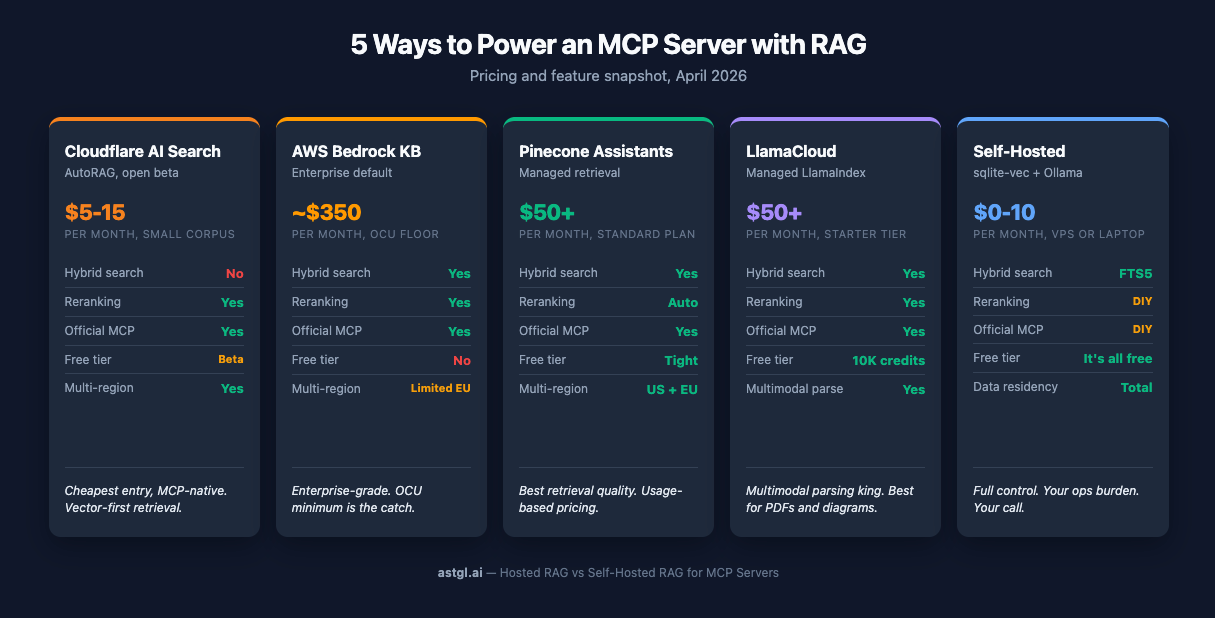
Five options worth your attention. One paragraph each.
Cloudflare AI Search (AutoRAG)
The newest entrant, currently in open beta. Cloudflare stitched together R2 for storage, Vectorize for embeddings, and Workers AI for inference, then wrapped the whole thing in a management API. Strongest pitch: near-zero config, pay-as-you-go, and an official MCP server ships with it. Weakest point: retrieval is vector-first. Cloudflare added optional reranking in October 2025, but there's still no published BM25 or hybrid-search path as of this writing. If your corpus is well-structured, you probably won't notice. If you're indexing messy enterprise content, you will.
AWS Bedrock Knowledge Bases
The enterprise default if you're already on AWS. Hybrid search (vector + BM25) is built in, Cohere reranking is available, and chunking modes range from fixed-size to semantic to custom Lambda. Titan V2 embeddings run at $0.02 per million tokens. There's an official AWS Labs MCP server for retrieval. And then there's the OCU landmine—which I'll get to in a minute, because it deserves its own sidebar.
Pinecone Assistants
Best-in-class retrieval, managed. Hybrid sparse-dense search with automatic reranking, configurable alpha weighting, managed embeddings abstracted away from you, and an official remote MCP server. Pricing is fully usage-based—$5 per million context retrieval tokens, plus input/output token, storage, and ingestion charges on top. The Standard plan has a $50/month minimum; the old $0.05/assistant-hour fee was removed. Free tier is real but tight—5 assistants per project, 1 GB storage, 500k input tokens, and 500k context retrieval tokens per month. Past that you're paying, but the retrieval quality is noticeably better than anything else on this list.
LlamaCloud
Managed LlamaIndex. Multimodal parsing that actually handles diagrams, configurable chunking modes, hybrid retrieval, reranking. The free tier gives you 10,000 credits a month—about a thousand pages. Paid tiers start at $50/month (Starter, 40K credits) and scale to $500/month (Pro, 400K credits). For a LlamaIndex-native team, the Starter tier is genuinely cheap; Pro is where the platform pays off. LlamaIndex ships `run-llama/llamacloud-mcp` (Python) and `run-llama/mcp-server-llamacloud` (TypeScript), plus a hosted gatway at mcp.llamaindex.aithe MCP story is actually stronger here than I initially realized.
Self-Hosted (sqlite-vec + Ollama)
This is what the ASTGL Knowledge MCP server actually runs on. sqlite-vec for vectors, FTS5 for keyword search (that's your hybrid search right there, no cloud required), and Ollama serving nomic-embed-text for embeddings, all of it on a $10/month Hetzner VPS or a Mac mini on my desk. Works well for up to around a million vectors in my testing. Real cost: infrastructure plus your time. The second one is the variable.
The Six Axes That Actually Matter
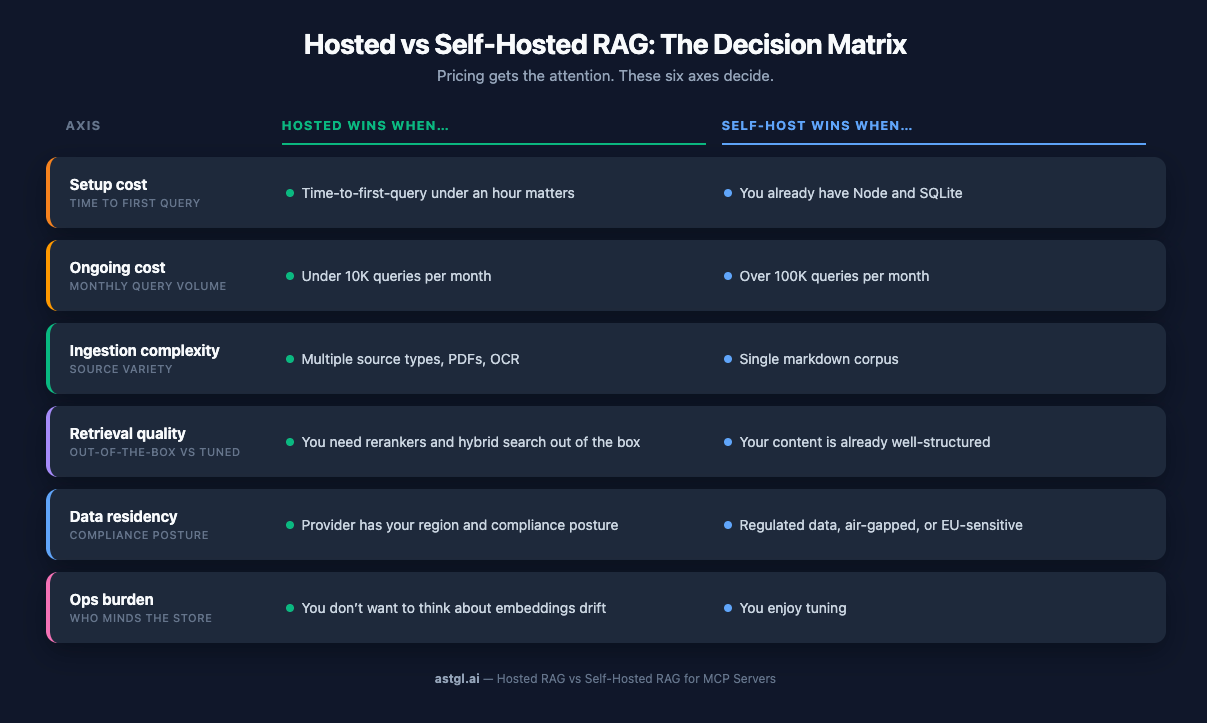
Pricing gets the attention, but it’s rarely the deciding factor. Here’s what I look at:
Setup cost
Time-to-first-query is where hosted services actually earn their money. Pinecone Assistants and Cloudflare AI Search will have you chatting with your docs in under a minute after signup—upload and go. Bedrock is the outlier on the hosted side: AWS documentation puts CloudFormation infrastructure deployment at 7–10 minutes, with a full hand-wired setup typically landing at 20–30 minutes. That's hosted pricing with self-hosted-ish friction.
Self-hosted with sqlite-vec and Ollama is about 30 minutes from `apt install` to first working query if you know what you're doing, longer if you're learning. For me it's fast because I've done it. For someone new to local LLMs it's a weekend.
Ongoing cost
This is where the story flips. For a small corpus with low query volume—think a few hundred docs and a few thousand queries a month—Cloudflare AI Search is genuinely cheap, maybe $5–15/month in storage and API costs. Pinecone Assistants sits at $20–50 in that range. Bedrock KB looks innocent until you hit the OCU minimum (more on that below). LlamaCloud's $50/month Starter floor is reasonable; the $500/month Pro tier is where the platform pays off at real scale.
Self-hosted is $10/month for a Hetzner VPS, flat. Mac mini on your desk? $0/month plus electricity. The per-query cost of hosted RAG is the thing that compounds when you scale—or when someone builds something that hammers it.
Ingestion complexity
This is the axis where hosted services earn their keep without argument. Bedrock KB and LlamaCloud both handle PDFs with embedded tables, Word docs, and (in LlamaCloud's case) actual diagrams, not just the text around them. Bedrock's Data Automation service charges $0.010 per page for parsing—not free, but a lot cheaper than writing your own PDF extractor.
Self-hosted with Ollama and sqlite-vec doesn't ship with any of that. If your corpus is markdown, you're fine. If it's a pile of PDFs from your legal team, you're either writing parsers or paying someone to.
Retrieval quality
All four hosted services offer hybrid retrieval except Cloudflare AI Search, which is vector-only as of this writing. Pinecone Assistants has automatic reranking baked in. Bedrock KB has optional Cohere reranking. Self-hosted with sqlite-vec can do hybrid via FTS5 for keyword matching combined with vector similarity, which is genuinely good—but you're the one writing the ranking logic.
For most queries on well-structured content, vector-only is fine. For ambiguous queries over messy content, reranking earns its cost.
Data residency
Self-hosted wins this one by default. The data never leaves your machine.
On the hosted side: Pinecone has US and EU regions with a DPA, and LlamaCloud has SOC 2 Type II and HIPAA. Bedrock's EU region support has been inconsistent in 2026 documentation—verify before you commit. Cloudflare's Data Localization Suite handles this at the platform level.
If you're in a regulated industry, audit the provider before you pick. Don't trust the marketing page.
Ops burden
This is the one nobody advertises. Self-hosted means you're responsible for:
Keeping Ollama updated
Monitoring embedding drift when you upgrade models
Backing up knowledge.db
Scheduling re-indexing when source content changes
Debugging why sqlite-vec suddenly returns zero results (hint: usually the embedding model changed dimensions)
Hosted services handle all of that. That's most of what you're paying for.
Sidebar: The Bedrock OCU Landmine
Bedrock Knowledge Bases advertises "no charge for the Knowledge Bases feature itself." Technically true. What they don't mention on the pricing page is that the vector storage layer requires a minimum of 2 OCUs—OpenSearch Compute Units—at roughly $0.24/hour each.
Do the math: 2 OCUs × $0.24/hour × 730 hours/month = about $350 per month whether your knowledge base has 10 documents or 10 million.
Nobody else on this list has a fixed cost floor like that. Cloudflare AI Search scales down to pennies. Pinecone Assistants has a real free tier. Self-hosted is $10.
If you're building something small and you're not already deep in AWS—Bedrock KB is the wrong answer. If you're running enterprise-scale search over millions of docs, that $350 becomes a rounding error, and the hybrid+rerank features earn their keep.
Know where you sit before you commit.
The MCP Angle
Here's the thing I didn't expect to find: every production RAG service on this list ships an official MCP server. Cloudflare, Bedrock, Pinecone, LlamaCloud—all of them. This went from "experimental" to "table stakes" over the past year.
Cloudflare AI Search → The official Cloudflare MCP server exposes AI Search endpoints
Bedrock KB → AWS Labs ships `bedrock-kb-retrieval-mcp-server`
Pinecone Assistants → Each assistant gets its own remote MCP endpoint, plus a local Docker option
LlamaCloud → `run-llama/llamacloud-mcp` plus the hosted MCP Gateway at mcp.llamaindex.ai
This wasn't true a year ago. The MCP ecosystem has absorbed the big RAG providers fast enough that "hosted RAG you can query from Claude Desktop" is now a checkbox feature.
Self-hosted doesn't ship with an MCP server—but wrapping one around your sqlite-vec database is a weekend of TypeScript. That's what the ASTGL Knowledge MCP server actually is: an MCP wrapper around vector search and Q&A retrieval over a SQLite database. The MCP part is trivial. The content curation and ingestion pipeline is 90% of the work.
The real insight: hosted RAG plus MCP wrapper is the modern middle path. You don't have to pick pure self-hosted or pure managed. Point a custom MCP server at Pinecone Assistants or Bedrock KB, and you get the retrieval quality of managed services with the MCP-native interface your agents expect. The `cloudflare/ai-search` MCP server does exactly this.
That changes the decision. It's not "hosted vs. self-hosted RAG" anymore. It's "Whose retrieval layer do I want behind my MCP server?"
Decision Framework
Enough philosophy. Here's the checklist I use.
1. Is your corpus under 500 docs and mostly static? Self-host. You'll spend more time reading hosted RAG docs than it would take to `npm install sqlite-vec`.
2. Do you have under 20 hours to ship this? Hosted. Pinecone Assistants or Cloudflare AI Search will get you to a demo faster than you can read the Bedrock IAM setup guide.
3. Are you charging money for this? Either hosted (you need the SLA) or self-hosted with a real infra budget and a pager rotation. Don't split the difference on production.
4. Is any of this data regulated—PHI, PII under GDPR, or financial? Self-host, or audit the hosted provider's compliance posture before you upload anything. Don't trust the marketing page. Ask for the SOC 2 report.
5. Are you already in AWS? Bedrock KB makes sense if your scale justifies the OCU floor. Otherwise, Pinecone.
6. Everything else? Prototype self-hosted with sqlite-vec. Migrate to hosted when a specific pain point forces the move. "We keep hitting embedding model drift" is a real reason. "It seems complicated" isn't.
The rule of thumb I use: pay for what hurts, self-host what you enjoy. If PDF parsing makes you want to quit, pay Bedrock or LlamaCloud. If SQL and vector search are fun, keep sqlite-vec.
What I'd Actually Build in 2026
If you asked me right now, for real scenarios:
Weekend side project. sqlite-vec plus Ollama plus nomic-embed-text. Runs on a laptop, costs nothing, and teaches you how RAG actually works. This is where I'd start every time.
Customer-facing SaaS feature. Cloudflare AI Search. Pay-per-query pricing means your costs track your usage. Official MCP server means Claude Desktop users can plug in directly. The open-beta caveat is real—verify the SLA matches your product's uptime needs before launch.
Enterprise RAG over thousands of internal docs. Bedrock Knowledge Bases if you're already in AWS and you'll comfortably exceed the OCU floor. Pinecone Assistants if you're not. LlamaCloud if your team is already deep in LlamaIndex and the multimodal parsing earns its cost. All three have hybrid search; all three ship MCP servers. Pick based on where your infrastructure—and your team's existing expertise—already lives.
Team knowledge base. Self-hosted if it's under five people and you've got one engineer who cares about it. Hosted the moment it crosses twenty users or someone non-technical needs to upload docs. The threshold isn't the document count—it's the human factor.
The sqlite-vec era isn't ending. It's just not the only answer anymore. A year ago, self-hosted was the serious choice, and hosted was for people who didn't want to learn. In 2026, that framing doesn't hold. Hosted RAG is production-ready, MCP-native, and sometimes cheaper than your own ops time.
Pick the tool that matches the job. That's it.
FAQ
What is Cloudflare AI Search?
Cloudflare AI Search (formerly AutoRAG) is a managed Retrieval-Augmented Generation service built on Cloudflare's platform. It combines R2 storage, Vectorize for embeddings, and Workers AI for inference into a single API. It's currently in open beta with vector-first retrieval and optional reranking, and ships with an official MCP server that lets Claude and other AI assistants query your indexed documents directly.
When should I use hosted RAG instead of sqlite-vec for an MCP server?
Use hosted RAG when your corpus exceeds a few thousand documents, you're ingesting multiple source types like PDFs or Word docs, non-engineers need to upload content, or you need a production SLA. Stick with sqlite-vec when the corpus is static markdown under about 1,000 documents, you control ingestion, and cost-per-query matters more than ops time.
Can I use the Cloudflare AI Search MCP with Claude Desktop?
Yes. Cloudflare ships an official MCP server that exposes AI Search endpoints as MCP tools. Add the Cloudflare MCP server to your Claude Desktop config, provide your API token, and Claude can query your indexed documents through the same interface it uses for any other MCP tool. The setup is documented in the Cloudflare MCP repository.
Related reading:*
How I Shipped an MCP Knowledge Server in a Weekend: the self-hosted case study this article references
How Do MCP Registries Work (Smithery, mcpt)?: finding MCP servers, including the ones in this article
Cortex: An Event-Sourced Memory Architecture for AI Coding Assistants: related exploration of the memory/retrieval landscape